According to the U.S. Food and Drug Administration, “Pharmaceutical and medical device manufacturers must incorporate in their quality assurance (QA) program several elements that relate to labeling in order to meet the Good Manufacturing Practice (GMP) requirements of the Quality System regulation. The QA program must be adequate to ensure that labeling meets the requirements with respect to legibility, adhesion, etc., and ensure that labeling operations are controlled so that correct labeling is always issued and used”.
To ensure compliance with general regulatory requirements for pharmaceutical products, Life Sciences Supply Chain Management provides additional labeling functionalities to allow users to print identity labels for lots (batches) and containers (sub-batches).
Labels can be printed with or without an external Label Printing software (for example, Bartender, NiceLabel).
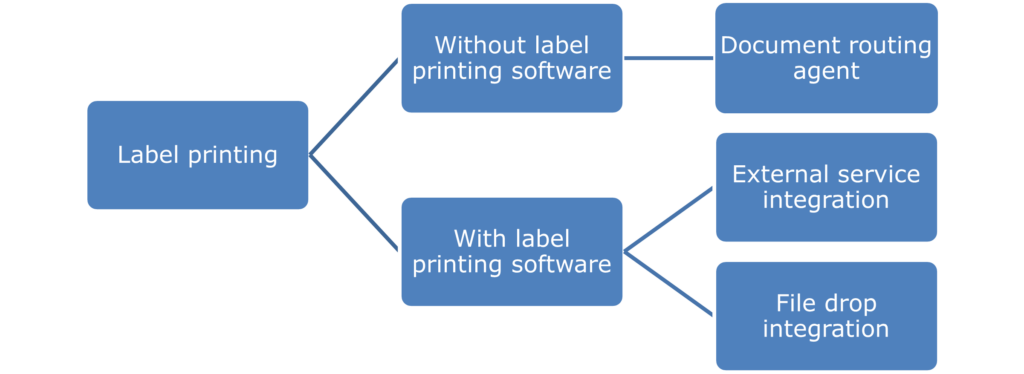
When labels are not printed via an external Label Printing software, document routing agents are required to print directly to an on-premises printer.
When labels are printed via an external Label Printing software, which is achieved either using file drop methodology or using external services as integration. This type of integration may be necessary for businesses with different applications and databases with varying printing needs scattered throughout their network. In such cases, the document to be printed can vary depending on the data included with the trigger file. The Integration Service can read and execute the command lines, telling the external software how to print the item depending on the specific instructions contained within the file.
In short, STAEDEAN Life Sciences provides the file drop method to create a text file containing both data and a Print Command Script, with the script instructing the external Label Printing software to:
Open the specified labeling document.
Use the trigger file as the data file.
Print from a specific printer.
Delete the trigger file.
Microsoft Azure has introduced a new transfer file tool to an on-premise machine to utilize the file drop methodology with cloud infrastructure. The graphic below illustrates the mechanisms involved in transferring files between and the external Label Printing software:
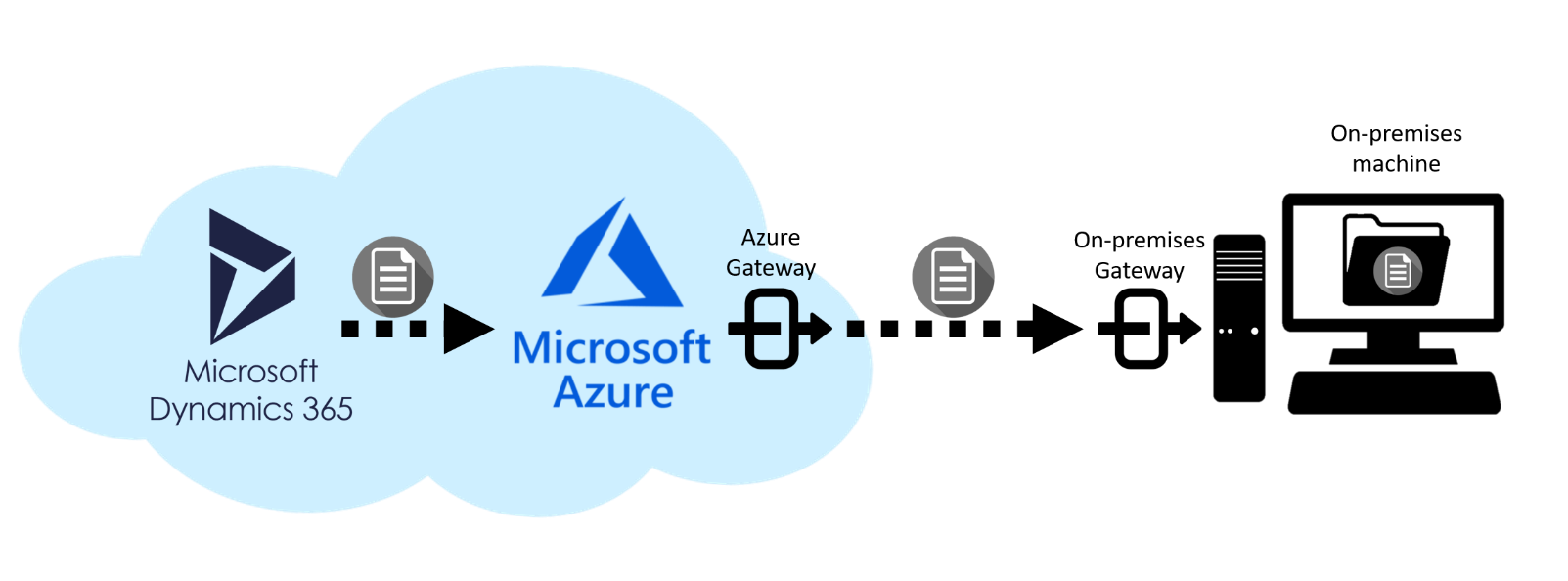
The document to be printed from Microsoft Dynamics 365 Finance & Supply Chain Management is saved directly in the Microsoft Azure cloud repository. In addition, the creation of gateways that link Microsoft Azure to the on-premises machine allows to automatically transfer the document to the desired folder in the on-premises storage.
The integration using external services allows label data transferring directly from the ERP system to the external Label Printing software without using Microsoft Azure components. This integration method provides the following benefits compared to the file drop method:
Cost saving since the cost of using Microsoft Azure components is avoided.
Simpler IT infrastructure.
Quicker response time (that is labels are printed in a quicker way compared to file drop method).
Reduce troubleshooting complexity and reduce required knowledge in Azure for maintenance.
Refer to the following sections for additional information about Life Sciences Supply Chain Management printing functionalities such as:
Advanced configurations to print labels via external software.
Capability to print inventory labels for batches and sub-batches.
Capability to print shipping labels as part of the packing activities.
Capability to print license plate labels.
Capability to reprint labels when damaged or unreadable..
Additionally, Life Sciences Warehouse Management allows printing labels via mobile device, while Life Sciences Weighing and Dispensing allows printing inventory labels during the dispensing process.