To define which tables and fields have to be exported and possibly compared, Life Sciences Cloud Compliance Suite enhances the standard Data validation checklist workspace allowing users to associate Microsoft Dynamics 365 Finance & Supply Chain Management tables with the menu items defined in the validation project.
In a data validation project, users can:
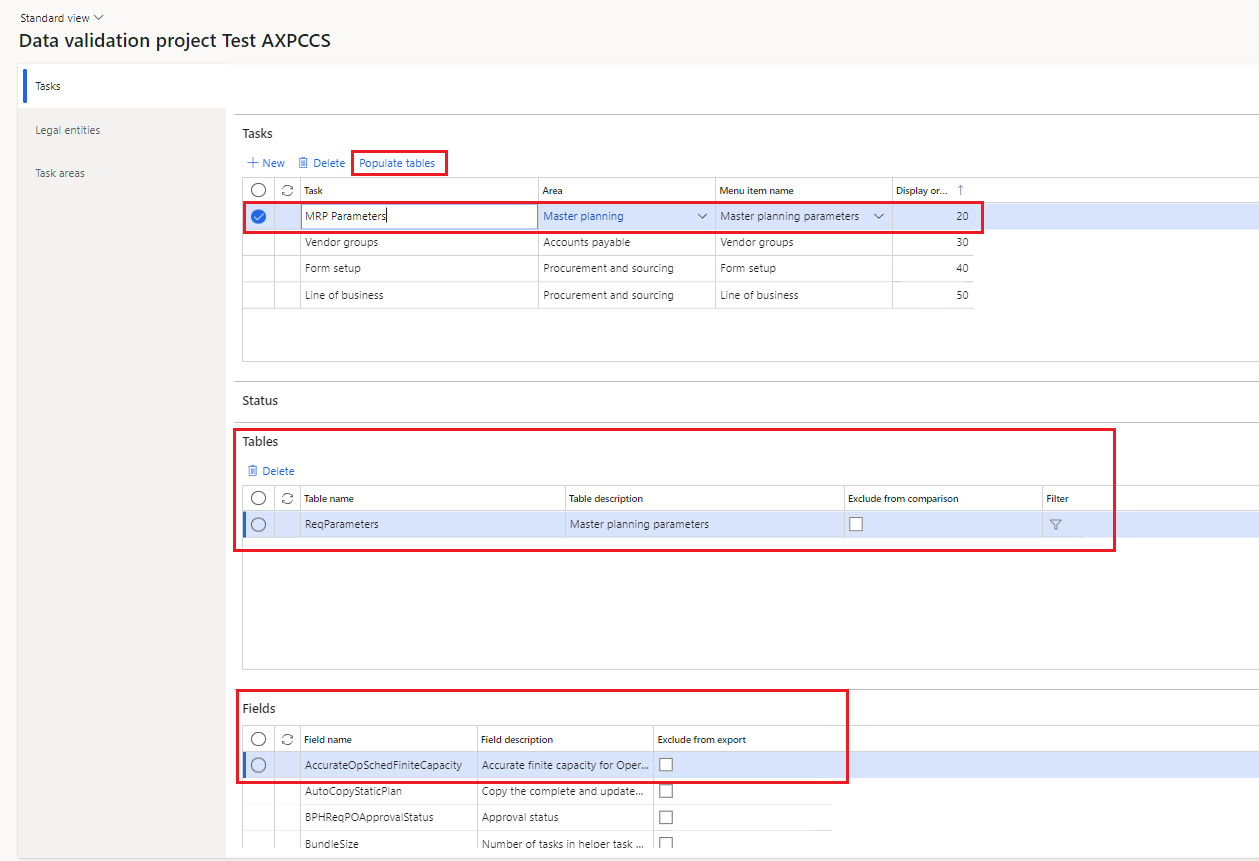
Create tasks and associate them with specific menu items in Microsoft Dynamics 365 Finance & Supply Chain Management (refer to standard Microsoft guidelines regarding the Data validation checklist workspace).
Select the tasks and click on Populate tables.
When new Microsoft standard or Life Sciences fields are added to a table that is already part of the project, select the task(s) and relevant table(s) and click Refresh fields instead of running Populate tables again. In the Refresh fields pop-up, click OK to update the fields listed in the Fields FastTab for the selected table(s) only, without re-adding all the tables linked to the menu item. Existing Exclude from export selections and table filters are kept.
Select, among the ones automatically linked to each menu item, which tables, records, and fields need to be exported and included in the comparison using the following fields:
Exclude from comparison: Allows users to export the table of interest and exclude it from future comparative analysis.
Filter: Users can filter a table and select a subset of records to be exported using standard Microsoft Dynamics 365 Finance & Supply Chain Management queries.
Exclude from export: Allows users to exclude specific tables’ fields from the export process.
It is also possible to run the fields refresh automatically for all existing tables using the new Data validation checklist fields refresh job (Life Sciences Cloud Compliance Suite > Periodic tasks > Data validation checklist fields refresh). The job can be filtered by Project name and run as a batch job. It does not create new tables, and existing table filters and Exclude from export selections are kept.
When all the tasks are configured, and the data validation project is ready, it is possible to export the Configuration evidence report and compare configurations between environments.