Use this task to manage documents (drawings, specifications, URLs, and related files) that are linked to PLM journal lines.
Steps
Go to Modules > Engineering change management > Periodic > PLM Integration > Staging journal.
Select the staging journal that you want to review.
Select Lines.
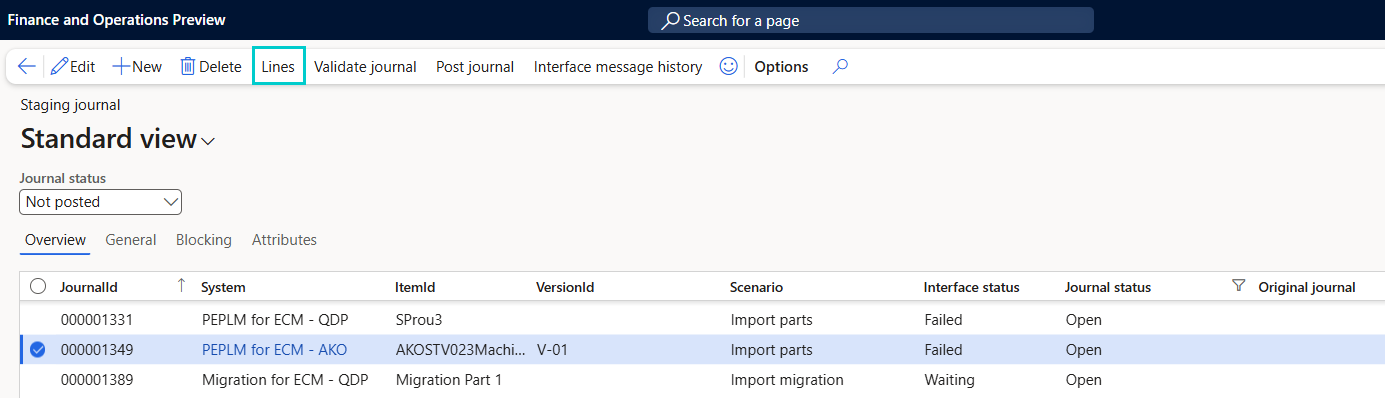
The PLM Journal Lines page opens and shows item-level records for the selected staging journal.
On the PLM Journal Lines page, select the item line that you want to review.
Go to the Documents tab.
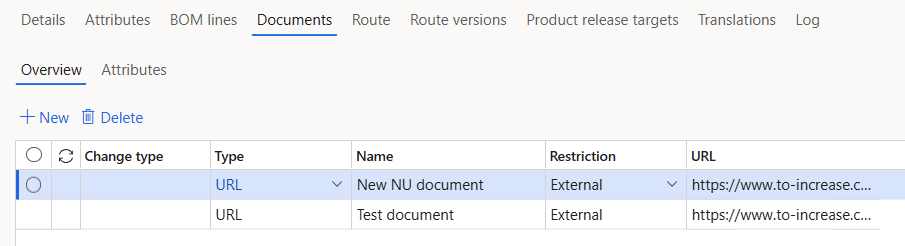
Select +New in the Overview section.
Enter the document details, for example Name, Restriction, and URL (link to the stored document).
Select Save.
You can select document and update the required fields.
If you want to remove the document line, select the line and click Delete.
You can manage the Documents attributes from the Attributes section on the Documents tab.
You can create an attribute as mentioned below:
Select + New.
Enter Name and Value.
Select Save.
You can create an attribute as mentioned below:
Select the attribute line.
Select Delete.