Use this task to add, review and update BOM components that are imported from the PLM system and stored in PLM journal lines.
Steps
Go to Modules > Engineering change management > Periodic > PLM Integration > Staging journal.
Select the staging journal that you want to review.
Select Lines.
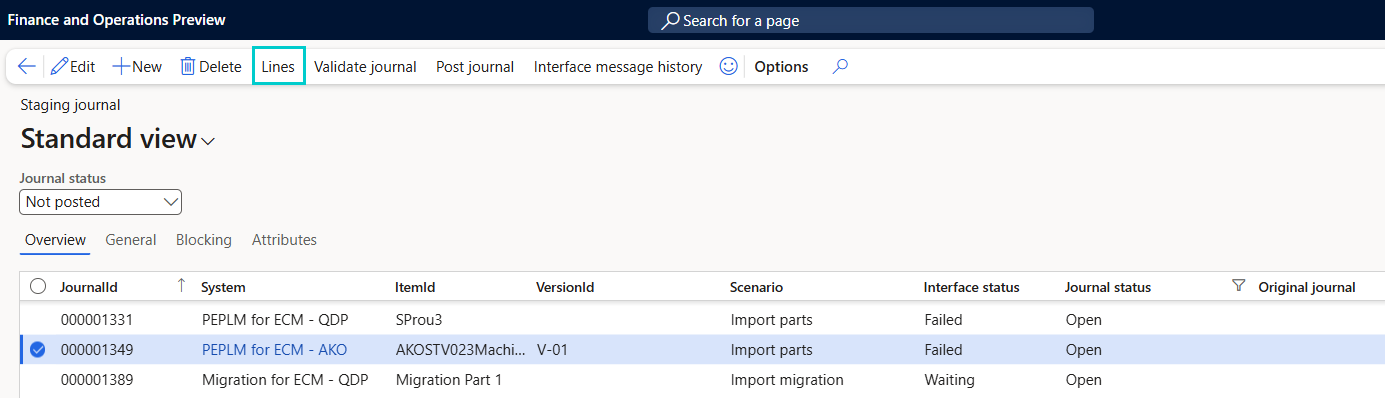
The PLM Journal Lines page opens and shows item-level records for the selected staging journal.
On the PLM Journal Lines page, select the item line that you want to review.
Go to the BOM lines tab.
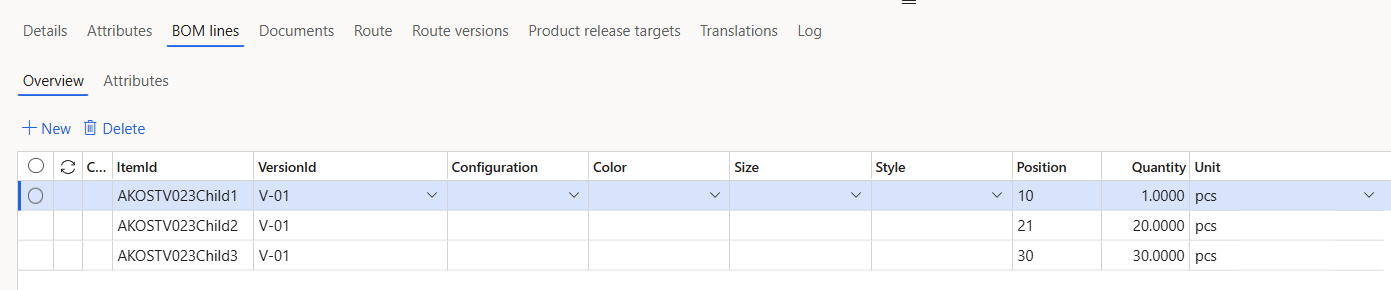
Select +New in the Overview section.
Enter the component details, for example ItemId, VersionId, Configuration, Color, and Size.
Optional: To pass inventory dimension values for the component, select the Attributes sub-tab of the BOM lines tab. Select +New, select the attribute, for example InventLocation, and enter the value, for example 12.
Select Save.
You can select and update the required fields.
If you want to delete the BOM line, select the line and select Delete.
Note
Values on the Attributes sub-tab are used during posting only when the attribute is mapped on the Inventory dimension mapping tab of the PLM system. For more information, see Configure Attribute Mapping.