Once your model is deployed, integrate it with the PLM application. This allows the PLM system to access the model endpoint for tasks such as BOM analysis and AI-driven engineering insights.
Steps
Go to Models > Engineering change management > PLM Integration > PLM Integration parameters.
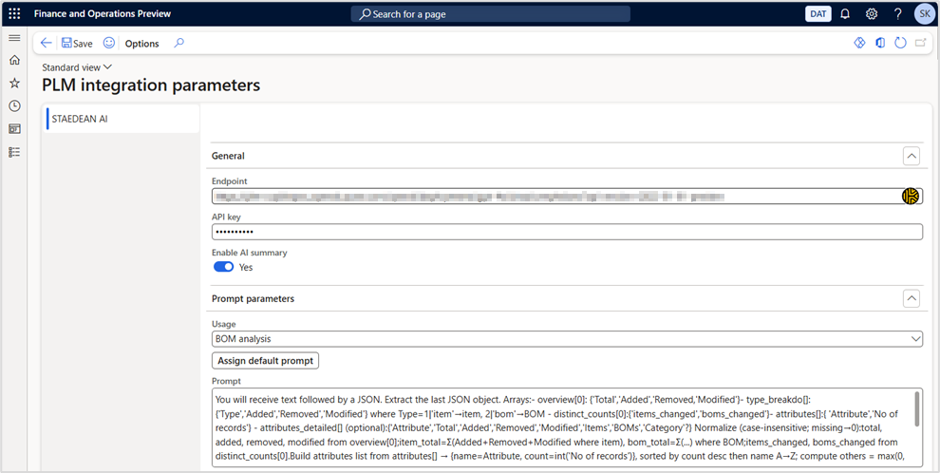
Enter the copied Target URL into the Endpoint field.
Enter the copied Key into the API Key field.
Enable the ‘Enable AI summary’ toggle button. By default, the toggle button position is Off.
Note
When the user enables Enable AI summary toggle button, the system verifies that both the Endpoint and API Key fields are filled. Is it checking the complete format or only validating the fields are not empty? If either field is empty, an error message appears, and the toggle cannot be enabled.
Select the Usage as BOM analysis.
Click Assign default prompt button, in the below Prompt field, a default prompt gets added.
Click on the Save symbol.
Note
Whenever you have opened the BOM comparison, the system will analyse the BOM and displays the AI summarized results.