The Details Parameters tab defines how D365 F&SCM handles data imported from the PLM system, including journal behaviour, document updates, and default values.
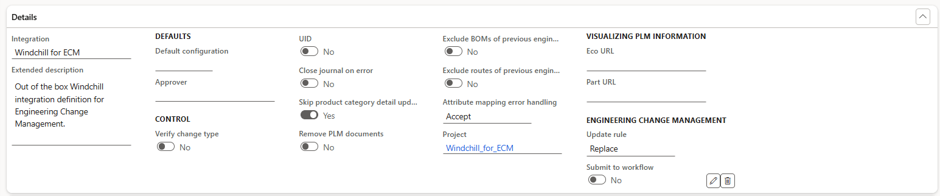
Field | Purpose |
Default configuration | Used when no configuration value is provided in the XML file. The value is applied to all items and BOM lines. Only used if the configuration dimension is enabled through the engineering product type. |
Approver | Defines the user who is assigned as the approver if a BOM is automatically approved and no approver is specified in the XML. |
Verify change type | Validates that the change type in the XML matches the change type in D365 F&SCM. (Not used for PEPLM integrations but available for other PLM connections.) |
UID | When set to Yes, the system uses the UID instead of the item number and version in the part URL. Use ‘%1’ in the URL pattern to indicate where the UID should appear. |
Close journal on error | Determines if journals with posting errors remain Open (editable) or are Locked after posting. Keeping journals open allows corrections and reposting. In production environments, it is recommended to disable this to avoid synchronization issues between systems. |
Skip product category detail update | If enabled, the system ignores a change in the engineering product type when reimporting a product. If disabled, the system throws an error and stops processing when the engineering product type differs. |
Remove PLM documents | Controls whether previously imported PLM documents should be removed when new messages contain no document data.
|
Exclude BOMs of previous engineering versions | Controls whether BOMs from prior engineering versions are copied to the new version.
|
Exclude routes of previous engineering versions | Controls whether routes from prior versions are copied to the new version.
|
Attribute mapping error handling | Defines how the system behaves when attribute mapping errors occur during import.
|
ECO URL | Defines the URL pattern used to open the corresponding Engineering Change Order (ECO) in the PLM system from within D365. Use ‘%1’ to represent the ECO reference. |
Part URL | Defines the URL pattern to open the related part in the PLM system. Use ‘%1’ for the item number and ‘%2’ for the version in the URL. |
Update rule | Determines how D365 F&SCM handles engineering change orders when a PLM journal is posted and an open ECO already exists.
|
Submit to workflow | Applicable only to the ImportECO scenario. Automatically submits newly created ECOs to the configured workflow for approval. |