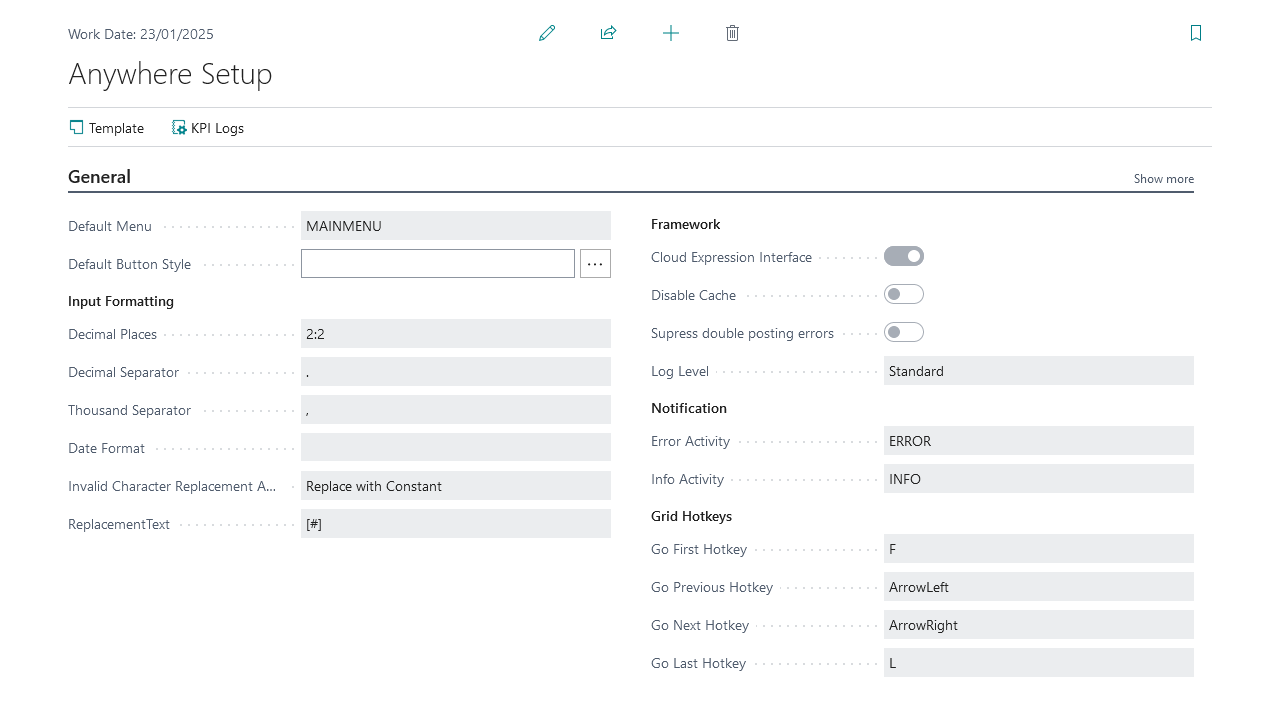
Property | Description |
|---|---|
Default Menu | Default start process, used when the user does not have one specified in their setup |
Default Button Style | Style used for the default button |
Controls the default decimal precision | |
Decimal Separator | Character used for the decimal separator |
Thousand Separator | Character used for the thousand separator |
Date Format | Format used to display date values |
Invalid Character Replacement | Option used when an invalid XML character is sent by the portal to Microsoft Dynamics 365 Business Central: Replace with Constant, Replace with Value, or Remove |
Replacement Text | Replacement text for invalid characters sent by the portal to Microsoft Dynamics 365 Business Central, when Invalid Character Replacement is set to Replace with Constant or Replace with Value |
Use the expression interface instead of registering codeunits | |
Disable Cache | Forces the web service to use the last version of the database |
Suppress Double Posting Errors | When documents post several times, suppresses those errors when detected |
Set the level of logging | |
Error Activity | The activity sent to a user when an error notification is generated |
Info Activity | The activity sent to a user when an info notification is generated |
Go First Hotkey | Hotkey used to go to the first line in a grid |
Go Previous Hotkey | Hotkey used to go to the previous line in a grid |
Go Next Hotkey | Hotkey used to go to the next line in a grid |
Go Last Hotkey | Hotkey used to go to the last line in a grid |
Portal URL | The URI to your Anywhere Mobility Portal |
Web Service URL | Web service URL used by the Portal to communicate with D365 BC |
Set the license key in the framework instead of the Portal |
Actions
Action | Purpose |
|---|---|
Template | Modify the control template suggested when a new activity is created |
Set up KPIs to log |
Decimal places
The field must use the following structure: "Minimum Decimal Value:Maximum Decimal Value", for example "2:2" or "4:6".
The Decimal Places field in Anywhere Mobility Solutions Setup is mandatory. It is initialised when installing or upgrading the app with the value from General Ledger Setup if specified there, or "2:2" otherwise.
Controls that have a field as their source also use the value from Anywhere Mobility Solutions Setup.