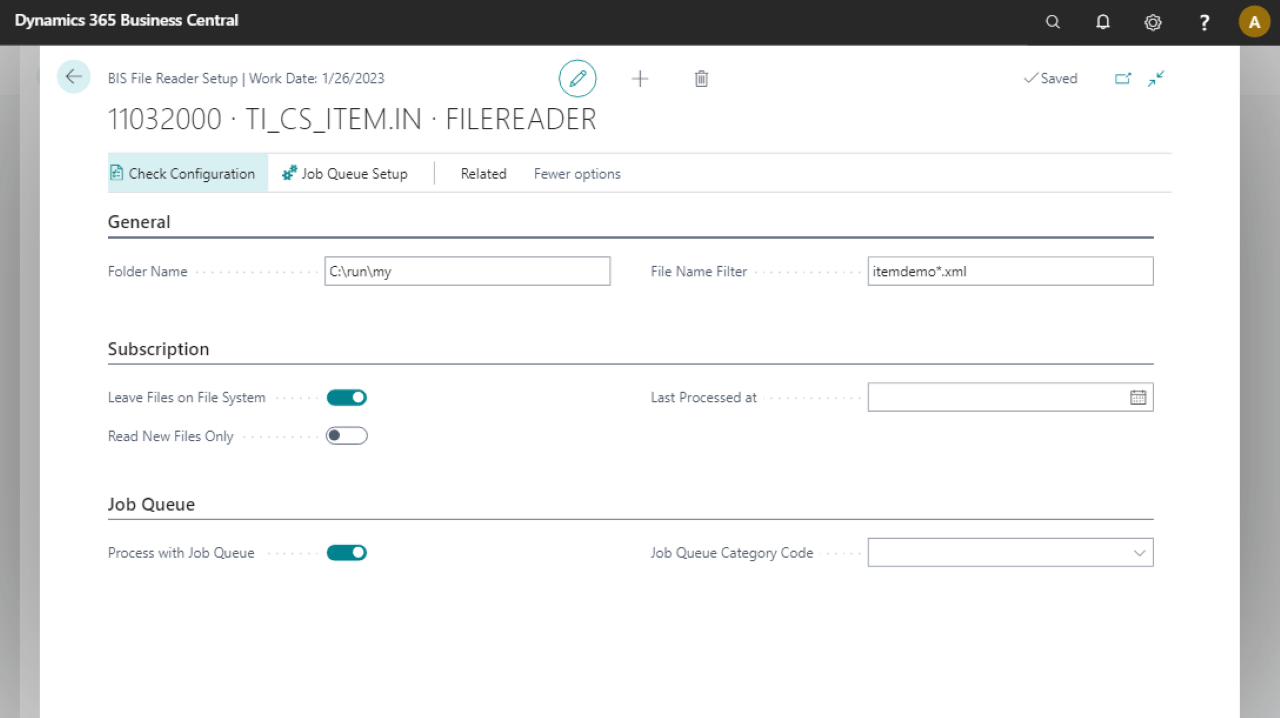
Use the File Reader endpoint to process external files with data into Microsoft Dynamics 365 Business Central.
Note
File Reader is only available for on-premise versions. Use the Azure File Reader for SaaS and for reading from Azure storage.
Steps
Create an import connection and insert the element FILEREADER.
On the elements line, select Edit.
On the File Reader Setup page, fill in the following fields:
Field
Description
Folder Name
Specify a network shared location. Ensure the Microsoft Dynamics 365 Business Central server user has sufficient permissions for the shared folder.
File Name Filter
Specify a file name filter, for example,
*.Xml.Leave Files on File System
When selected, files in the file system are not deleted after processing.
Read New Files Only
When selected, only new files are read.
Last Processed at
Populated automatically.
Process with Job Queue
Select this field to process the File Reader endpoint using the job queue.
Job Queue Category Code
Specifies the code of the job queue category to which the job queue entry belongs. Select the field to choose a code from the list. When a job queue category code is defined, messages for this connection run in a serial manner.
Select Check Configuration to see if there are Anywhere Mobility Solutions configuration errors.
Select OK.