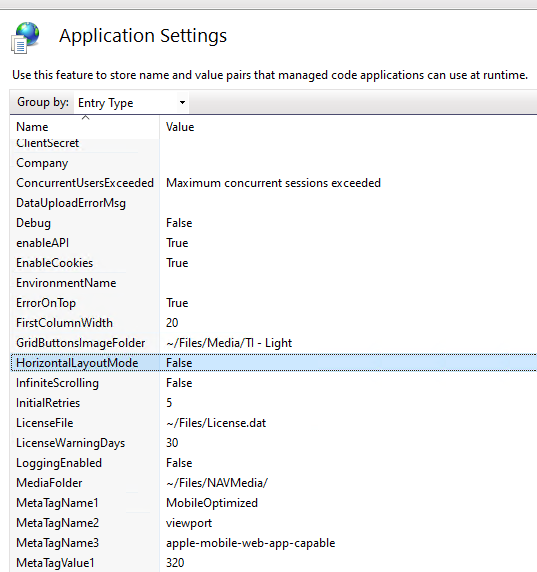
This page describes the different application settings available in the Anywhere Portal.
Settings overview
Setting name | Area (Cloud/On Premise) | Purpose |
|---|---|---|
Both | The endpoint of the Microsoft Dynamics 365 Business Central API | |
Both | Defines how the portal authenticates with the Microsoft Dynamics 365 Business Central web service | |
Cloud | URL where the authorisation token is requested | |
Cloud | The ID of the app registration in the Azure tenant | |
Cloud | Used with the ClientID to authenticate as an Azure App | |
Both | Links the portal to one company in the tenant | |
Both | The message returned when no more users can log in | |
Both | The message returned when an upload of files or pictures exceeds the maximum size | |
Both | When enabled, error messages show more detailed information | |
Both | Switches the communication channel between SOAP and API (OData); default false (SOAP) | |
Both | Enables cookies to save the current selected company in the company dropdown on the login page | |
Cloud | The environment that the portal connects to (Production/Sandbox) | |
Both | Determines where the error displays when an error occurs before or after the first control (default false) | |
Both | The width of the first column on grids when no fields are present | |
Both | Obsolete | |
Both | Controls shrink or adjust when the screen width is below 320px | |
Both | Switch between pages or one continuous list | |
Both | How many attempts the portal makes to connect to the web service | |
Both | The local path to the license file | |
Both | Creates a log containing all communication between D365 BC and the Portal | |
Both | The local path where media files are stored, both static and dynamic | |
Both | MobileOptimised | |
Both | 320, default width of a window | |
Both | Viewport | |
Both | Used for scaling on high resolution screens | |
Both | For Apple Devices | |
Both | Set capability | |
On Premise | To pre-authenticate the user to the web service | |
Cloud | Set up in the Azure App Registration; must point to this website | |
Cloud | Fallback when the RPN URL does not match the web service URL | |
Both | Determines when a user must log in again (default 20 minutes) | |
Both | The stylesheet applied to the portal | |
Both | The (Azure) tenant | |
Both | Use icon font instead of images | |
Both | The SOAP URL from the Microsoft Dynamics 365 Business Central service | |
On Premise | Web service user credentials | |
On Premise | Web service user credentials | |
On Premise | Web service user credentials |
Setting details
Api Base URL
The API base URL is the endpoint where the Portal retrieves the license from. APIs use the OData protocol, which requires OData to be enabled on the server.
Note
See Microsoft Learn for more information.
For cloud environments, the API base URL is typically: https://api.businesscentral.dynamics.com/v2.0/
For on-premise, the API base URL is typically: http://localhost:4048/BC/api
http://
Note
See Microsoft Learn for details on endpoint structures.
Authentication type
The values available for this setting are:
Value | Comment |
|---|---|
OnPrem | Connects to an on-premise environment. This is the default value. |
AzApp | Connects to an Azure environment via an app registration with ClientID and Secret. |
AzDelegate | Deprecated. Uses the credentials from an admin to delegate permissions. |
AZUser | Deprecated. Requires users to log in to Azure first, then access the portal with their mobile user account. |
The authentication type determines whether the portal connects to a Microsoft Dynamics 365 Business Central environment with local or domain users, or via Azure authentication methods.
Note
If configured incorrectly, an error may occur suggesting that AZApplication is a valid setting. This is a known issue.
enableAPI
Default value: false
The portal communicates via SOAP with Microsoft Dynamics 365 Business Central, except for the license. When enabled, all communication goes through the API channel. This provides a minor performance improvement and better error handling. The SOAP channel only handled some error types. Via the API channel, error handling is improved at SaaS level and errors are no longer obfuscated with an HTTP 500 message.
Company
Default value: (empty)
When empty and connected to an environment with several companies, a dropdown appears on the login page for company selection. When you fill in this setting, the dropdown disappears and users can only log in to one company.
License file
The license file key has the initial value of:
~\Files\license.dat
To accommodate the new license model (see License update), the Portal uses the folder to retrieve the license file. From 1 October 2023, only .tilicense files are valid.
SessionTimeOut
Default value: 20 (minutes)
Determines how long a session remains active in the user's browser before they must log in again. This requires cookies to be enabled. In the Anywhere Framework, sessions remain active indefinitely until the user logs out. When a session becomes inactive, the user is automatically redirected to the login page. Otherwise, they return to the last page they visited.
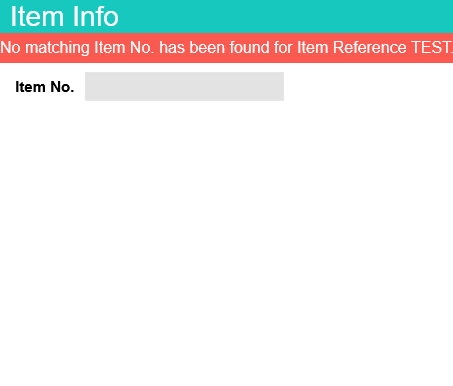
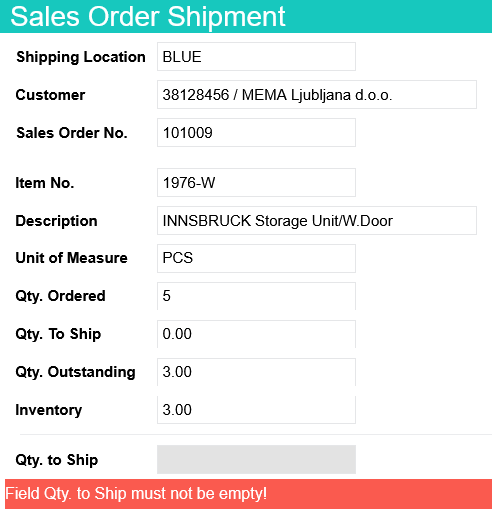
ErrorOnTop
Default value: false
Enable this setting to display error messages at the top of the portal page.
When enabled:
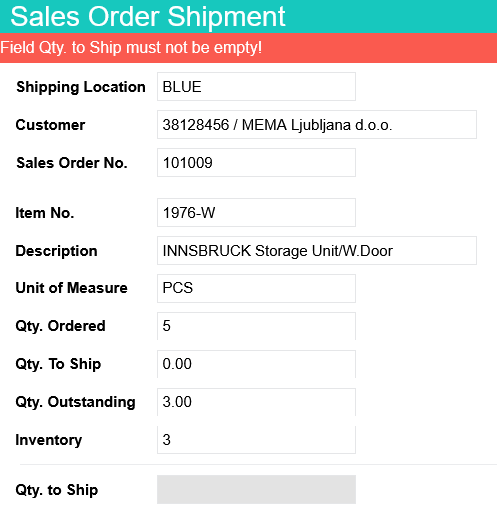
When disabled:
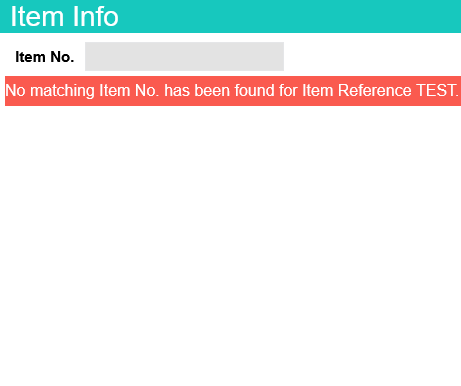
WebServiceURL
The web service URL used to connect to Microsoft Dynamics 365 Business Central. For cloud configurations use https://api.businesscentral.dynamics.com/. For on-premise, the web service URL is typically http://localhost:4047/BC/WS/.
HorizontalLayoutMode
Default value: false
Enable this setting to display controls horizontally. Controls shrink or adjust when the screen width is below 320px for better device responsiveness.