Industrial Equipment Manufacturing (IEM) for Microsoft Dynamics 365 Business Central supports the customer-driven (pull) style of manufacturing.
In the value chain for the customer-driven style of manufacturing, manufacturing is the foundation. Because there are many variations of this style, the tools to support actual manufacturing must be flexible.
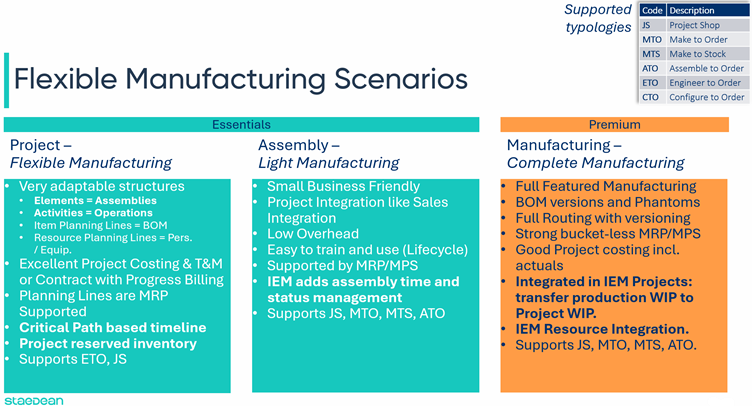
The flexibility addressed here is in the organization of production. In the customer-driven style of manufacturing, there is a large variation in manufacturing scenarios that can vary per organization and per product. As products evolve over time, manufacturing methods evolve with them.
Microsoft Dynamics 365 Business Central reflects this in its licensing structure by including the manufacturing module in the Premium license. This does not mean you can only manufacture with the manufacturing module: the schedule above shows the possibilities of the Essentials license in combination with Industrial Equipment Manufacturing.
Project: Flexible manufacturing
The basic project shop works with walk-in customers who present a sketch or drawing with the question: "Can you make this for me?" Wikipedia defines it as follows:
Project shops are typically small manufacturing systems that handle project production, custom or semi-custom manufacturing processes such as small to medium-size customer orders or batch projects. Project shops typically move on to different projects (possibly with different customers) when each project is completed.
The project shop and engineer-to-order styles of manufacturing are closely related. Complexity lies in working efficiently with very adaptable structures. In Industrial Equipment Manufacturing, complex structures can be decomposed with the element and activities work breakdowns to add more structure to the deliverable:
An element becomes a sub-assembly of the deliverable with item planning lines as components. Because these planning lines are picked up as demand by Microsoft Dynamics 365 Business Central's MRP, material supply is managed and pegged to the project through Microsoft Dynamics 365 Business Central's dynamic order tracking. When you do not want material supply to behave dynamically, make the links between supply and demand fixed by using Order Planning's reservation system.
The Activities work breakdown structure defines departments (work centers or machine centers). When combined with the Elements WBS, the project task becomes a specific operation.
When customers return more frequently for the same or similar products, these structures can be saved in templates so new projects can be created efficiently.
Assembly: Light manufacturing
With Industrial Equipment Manufacturing-enhanced assembly orders, a light manufacturing style can be implemented based on the Microsoft Dynamics 365 Business Central Essentials license. Assembly orders work with the assembly BOM linked to an item. Industrial Equipment Manufacturing adds assembly time to the item so the planner has an indication of how much time is required for the assembly order. The assembly order then shows a starting and ending date and time based on the number of resources assigned.
When adding assembly items to a project task budget or planning line, you can modify the assembly BOM and create a project-specific version of that item. This function also calculates a project cost for the modified assembly BOM. In this way, you can create basic versions of items and then make them customer-specific in the project.
Assembly orders can also be used to organize subcontracted work from the project. For example, when zinc plating is subcontracted, create an assembly BOM with the blank item and attach it to the zinc-plated item. Use the assembly order to pick the material to deliver to the subcontractor. Post and complete the assembly order when the zinc-plated item is received.
Manufacturing: Complete manufacturing
The manufacturing module, as part of the Premium license, offers all the features shown in the schedule at the start of this page, and more. Industrial Equipment Manufacturing fully integrates this module into projects. You can create project-specific versions of the production BOM and routing, calculate a project cost for the project-specific item, and create production orders from the project.
For project-specific production orders, the work in process can be transferred to the project when the production order is set to the status Finished.
With Industrial Equipment Manufacturing, you are not limited to one style of manufacturing: you can mix and match throughout the same project. Manufacture standard components in small series as production orders. Assemble standard components to higher-level sub-assemblies through assembly orders. Use production order routings for detailed work instructions in engineer-to-order. Use project tasks to plan final assembly or installation at the project site.