Industrial Equipment Manufacturing (IEM) for Microsoft Dynamics 365 Business Central supports the customer-driven (pull) style of manufacturing.
In the value chain for the customer-driven style of manufacturing, a detailed timeline is very important to drive the supply chain and resource planning. Microsoft Dynamics 365 Business Central maintains several dates to ensure inventory arrives on time.
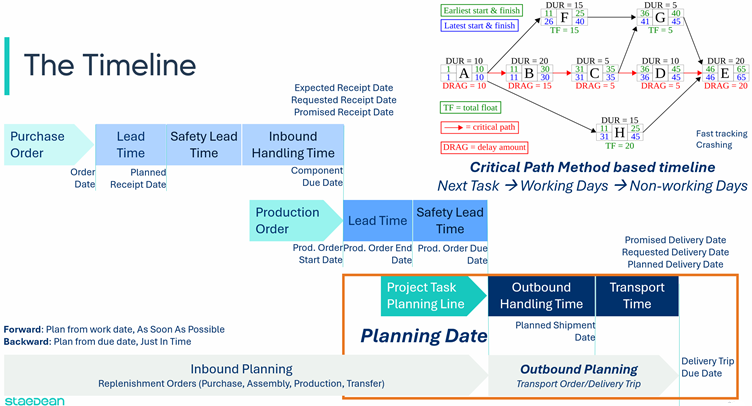
In Industrial Equipment Manufacturing, the Planning Date on the project task planning line is the starting point for the material requirements planning (MRP) or Order Planning calculation. The planning date is set by the project task starting date to ensure material is available when the project task starts. From there, Microsoft Dynamics 365 Business Central MRP takes over.
To calculate the project task timeline, Industrial Equipment Manufacturing uses the Critical Path Method (CPM) to calculate the shortest time required to complete the project. That calculation is based on the following settings:
Next Task: which can be sequential or a set of tasks to plan project tasks in parallel.
Estimated number of working days for the project task.
A non-working day calendar to specify weekends and national holidays.
With this data, CPM calculates project task starting and ending dates in either a forward (ASAP) or backward (JIT) direction. When one of the dates on a project task changes, the planner can start a recalculation of the following tasks.
To support projects where material must be delivered for installation on a project site, Industrial Equipment Manufacturing adds outbound planning dates to the project task: a delivery date set by the project task end date, and a planned shipment date that takes warehouse handling and shipping time into account.