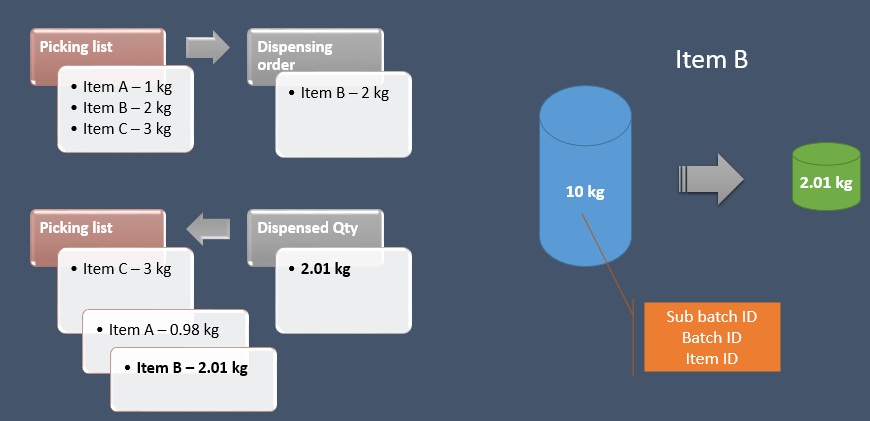
If a request is linked to production picking lists, the Dispensing order and Enable subdivision parameters must be disabled in the Inventory and warehouse management parameters form so that the list of components and quantities to be weighed is defined in a production picking list journal.
For items to be dispensed, the production picking list journal lines are grouped by Lot ID, independently from the transactions.
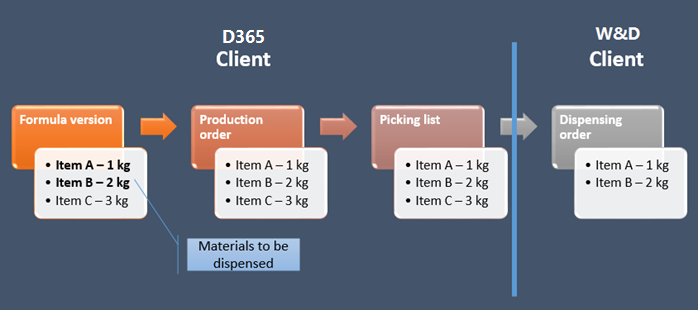
The Life Sciences Weighing and Dispensing process starts with the transfer of materials defined in the production formula to the dispensing area and ends with the storage of unused quantities of dispensed material transferred to the production area.
To transfer components to the Life Sciences Weighing and Dispensing Client, an authorized user must release the production picking list by clicking the Release to dispensing button.
At this stage, if no control fails, the production picking list is sent to dispensing, and its Dispensing status is set to Released.
In case of required modifications to the production picking list, the authorized user can reset the status back to Not released by clicking the Reset dispensing status button.
From production picking list to Life Sciences Weighing and Dispensing
From Life Sciences Weighing and Dispensing to production picking list