Note
These connections are based on the Business Integration Solutions Connectivity Studio. To properly maintain this function, detailed knowledge of Business Integration Solutions is required. This is a limited explanation of elements required in connections to make engineering change exports and imports.
Engineering Change Request (ECR)
In the example scenario, the ECR is processed based on a lifecycle. When the ECR is approved and the lifecycle is set to the PROCESS state, the connection is triggered. The example Engineering Change Management-ECR connection has the following elements:
Type Code | Type | Description |
|---|---|---|
LIFECYCLEEVENT | Event | Event triggered by the Engineering Change Management-ECR lifecycle, State Code 40-PROCESS. |
XMLGENERATOR | Activity | Creates an XML file from the ECR record. The fields included in the XML file are defined in an Internal - Export Document (ECM-ECR). |
FILEWRITER | Endpoint | Writes the XML file to the drop folder on the file system. |
.png)
Engineering Change Order (ECO)
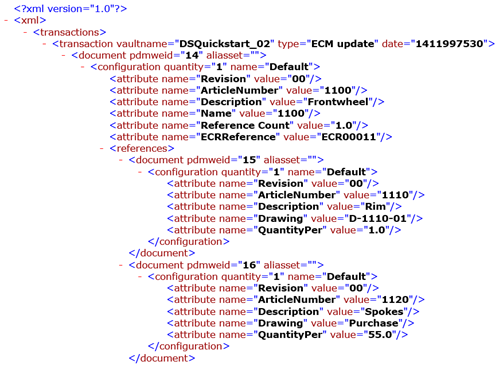
When the ECR is processed, engineering submits the changes from the engineering system as an XML file. The XML file is placed in a drop folder on the file system from where an Engineering Change Management connection retrieves it. Processing the file can be manual or handled by a job queue as provided by Business Integration Solutions: N111 Job Queue Handler. The example Engineering Change Management-SOLID connection has the following elements:
Type Code | Type | Description |
|---|---|---|
FILEREADER | Endpoint | Reads the XML file from the drop folder either manually or processed by a job queue. |
XMLTOXMLTRANSLATOR | Activity | Optional XSLT to transform an XML to a new XML layout. |
MAPPER | Activity | Maps an external document to an internal document. The external document represents the converted XML as created by engineering. The internal document represents the Engineering Change Staging. |
RECORDGENERATOR | Activity | Based on the Mapper output, creates an Engineering Change Staging record in Microsoft Dynamics 365 Business Central. |
EVENTGENERATOR | Activity | Optional: triggers a job queue for a follow-up action such as creating an Engineering Change Order from the Engineering Staging. |