Use this task to set up a Webservice event, which imports data into or exports data from Microsoft Dynamics 365 Business Central based on a call to the Microsoft Dynamics 365 Business Central web service from an external party.
Steps
Create an export connection and insert the element WEBSERVICEEVENT.
On the elements line, select Edit.
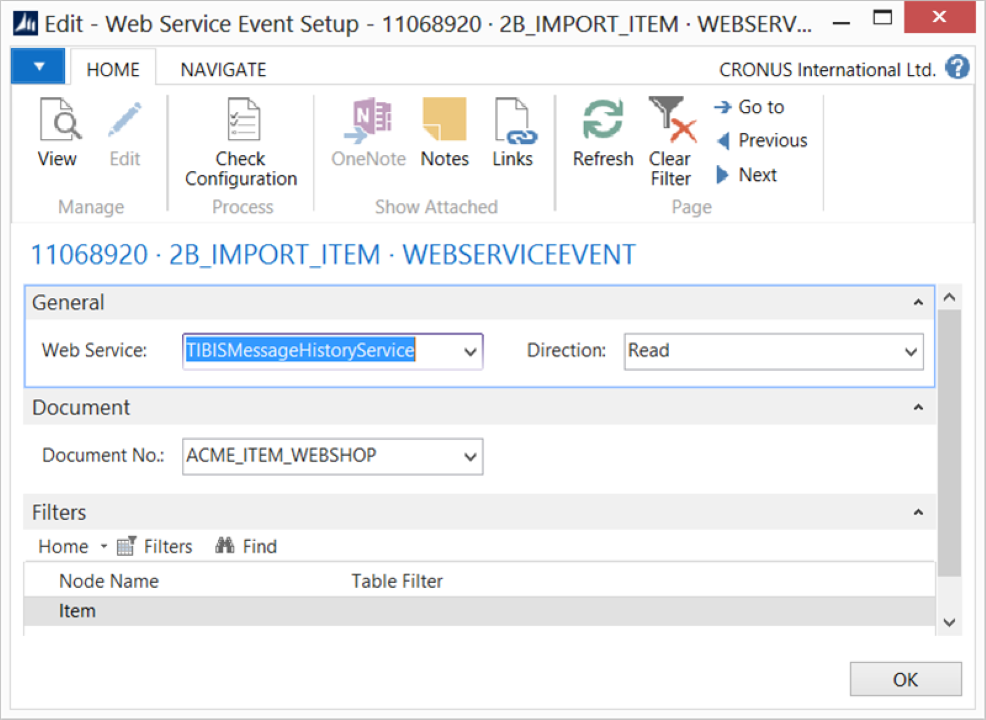
On the Web Service Event Setup page, fill in the following fields:
Field
Description
Web Service
Specify an existing web service created and published in the current database.
Direction
Specify whether to use the Webservice Event for reading, writing, or both.
Document No.
Specify the internal document on which the data reads or writes.
Node Name
Used for filtering. Node names follow the internal document structure.
Table Filter
Specify the table filter. This filter applies to the data set.
Select Check Configuration to see if there are Anywhere Mobility Solutions configuration errors.
Select OK.