In Business Integration Solutions, the Async Web Service is similar to the Web Service event but instead of acting as a trigger at the start of the process, it sits in the middle of a process. When the next activity in the pipeline is the Async Web Service activity, the process status sets to pending and pauses, waiting for the correct incoming request to continue.
Usage
Use the Async Web Service to wait for an HTTP request during the execution of a process (connection, publication, and so on).
The Async Web Service expects an id in the body of the request from the external party. This id identifies which activity in which process the incoming request should trigger.
The endpoints that you can use with Async Web Service are:
Endpoint | Description |
|---|---|
WriteDocumentWithResponseById | Writes input data to the message body and triggers the pipeline to continue. When the pipeline execution stops, the message body returns in the response. |
WriteDocumentById | Writes input data to the message body and triggers the pipeline to continue. No content returns in the response. |
ReadDocumentById | Triggers the pipeline to continue with a specific document specified in the configuration of the activity. The message body returns when the pipeline stops executing. |
ReadDocumentWithFilter | Triggers the pipeline to continue with a specific document specified in the configuration of the activity, together with the inputted filter. The message body returns when the pipeline stops executing. |
Concept
Like the Web Service event, the Async Web Service uses standard Microsoft Dynamics 365 Business Central web service functionality as much as possible.
An external party calls the Microsoft Dynamics 365 Business Central web service. The call goes to the Business Integration Solutions Web Service Event codeunit via the link to the Microsoft Dynamics 365 Business Central web service. The pipeline triggers if the id in the body of the request matches the expected id in the configuration of the activity.
Setup
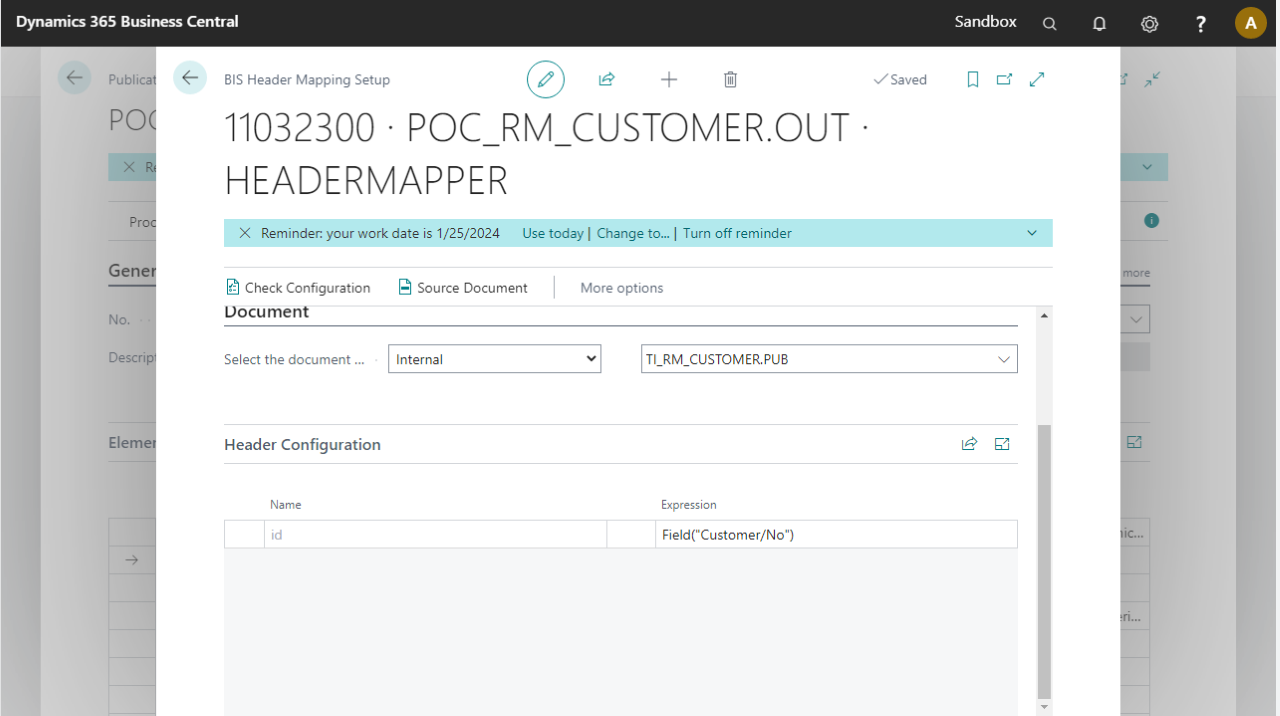
The Async Web Service activity requires a Header Mapper activity in a previous step. The Header Mapper activity specifies the expected id to receive to trigger the process to continue. In the example below, the expected id is the customer number in the message body at that time. The request needed to continue the process must therefore have the customer number in the id field in the body.
Header Mapper Configuration
Request (read example)
POST http://
{
    "id": "10000"
}
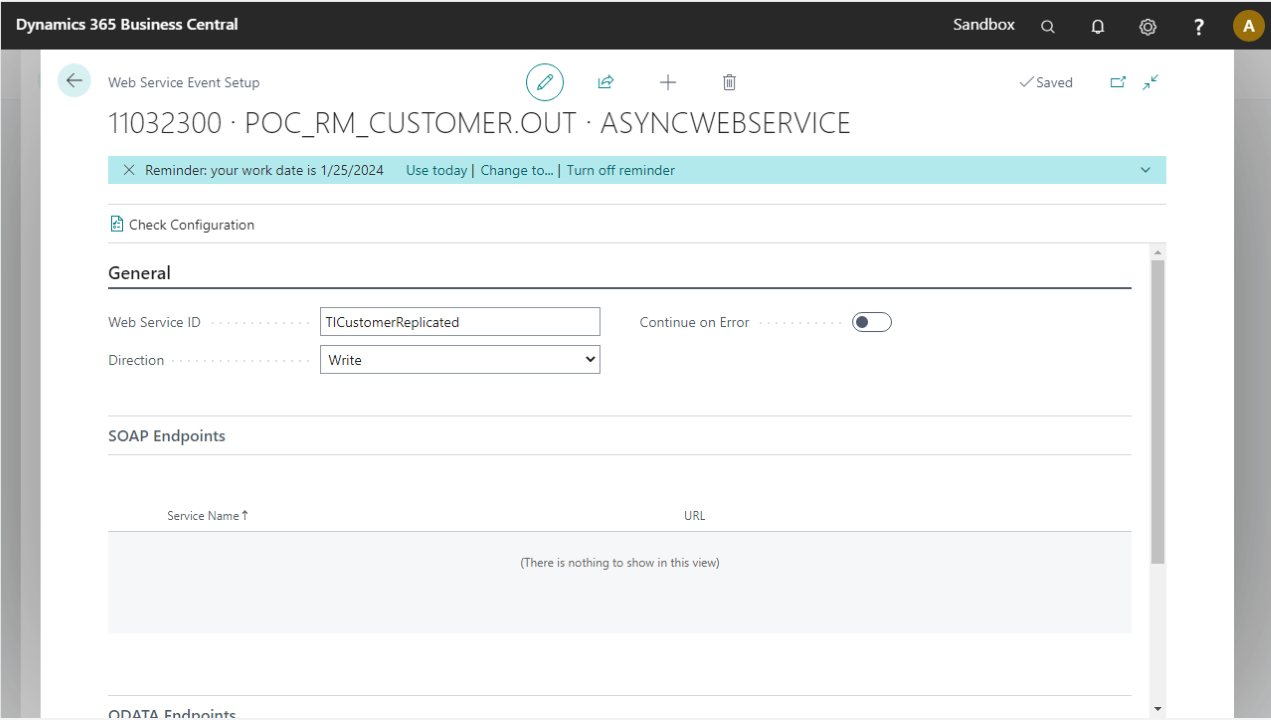
Async Web Service setup page
The Async Web Service setup page contains the following tabs:
Tab | Field | Description | More info |
|---|---|---|---|
General | Web Service ID | Unique web service identifier across all connections. Used as part of the URL as shown above. | |
Direction | Indicates the direction of the web service: Read, Write, or Read and Write. | ||
Continue on Error | When enabled and the web service call returns an error, the pipeline does not stop. | ||
SOAP Endpoints | Displays all available SOAP endpoints for the web service event. | ||
ODATA Endpoints | Displays all available OData V4 endpoints for the web service event. | ||
Document | Document No. | Internal document on which the web service call bases. This applies only to Read directions. | |
Filters | Filters applied on the dataset. This applies only to Read directions. |
Additional request examples
Read Document With Filter
POST http://
{
    "id": "IDExpectedByProcess",
    "tableFilterString": "Item: No. = 1000..1001"
}
Write Document
POST http://
{
"id": "1000",
"documentString": "ITEMFROMASYNC Item from async