Find information on Release 10.0.44.54 (January 2026) of RapidValue for Microsoft Dynamics 365 Finance & Supply Chain Management.
What’s new
New or changed features in Release 10.0.44.54 (January 2026) – RapidValue.
1. Extended character limit
In order to address previous limitations and concerns, character limit of certain fields has been increased.
Fields with increased character length:
BpmRequirementName
BpmExternalReference
BpmSuiteId
BpmTestCaseId
BpmTestRunId
2. Image storage in Azure
Due to a change introduced by Microsoft, the previously used methods of storing and displaying images have become incompatible with RapidValue. The image URLs provided by the local blob storage expire after a 7-day period, making images included in the RapidValue content unavailable.
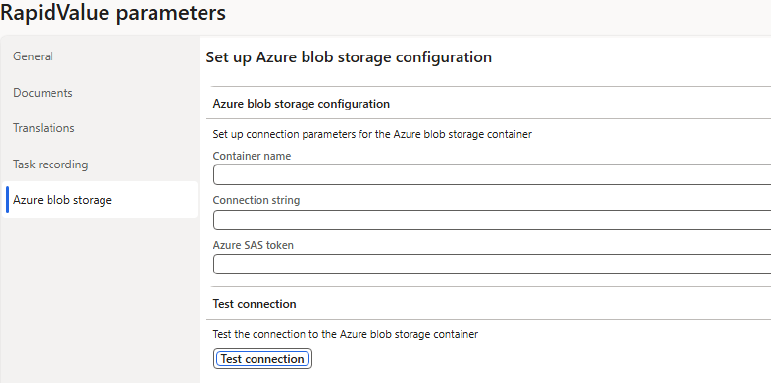
The old storage is replaced with an external one, to provide control over the URL lifespan and image availability. The new image storage relies on Azure blob storage. The details of the storage can be configured in the Azure blob storage tab of the RapidValue parameters. The container name and the connection string are used when uploading the image to the storage, while the SAS token is used to create a valid URL that allows for the image to be rendered within RapidValue.
The uploads are handled via the Upload image to blob storage menu item. The upload form with provide a resource URL that can be used within the HTLM editor of the RapidValue elements.

Unfortunately, previously uploaded images will remain unavailable due to the way RapidValue stores the images within HTML structures. Users will have to replace the images in their content by uploading images to the newly configured blob storage and replacing the image URLs.
Functionality-wise, the new image upload is similar to the previously available one, except for the fact that the image URLs are no longer retained in the form.
Bug fixes
Bug fixes in Release 10.0.44.54 (January 2026) - RapidValue.
Bug ID | Title | Description |
|---|---|---|
225076 (CS00237439) | Resolution of RapidValue Activities Open in Wrong Screen/Tab | Fixed instances where RapidValue Activities opened in the wrong screen/tab |
226761 (CS00237717) | Resolution of RapidValue – Process – Broken Images | Due to Microsoft changes, the previously available methods of storing and rendering the images in RapidValue became incompatible. To address this issue, image storage has been relegated to external Azure storage. Users can configure Azure storage details on the RapidValue Parameters form. |
Known issues
Known issues in Release 10.0.44.54 (January 2026) - RapidValue.
ID | Description |
|---|---|
184747 | Tiles in My business processes workspace don't filter detail forms to correct set of records. |
19349 | Horizontal scroll bar in Views (Goal maps etc.) missing. |
23153 | Trying to import a solution file is consuming lot of time while analyzing. |
23165 | Click on the New window in the Flow designer is not showing the designer area. |
24217 | Data entities support viewing but not always editing in Microsoft Excel. |
24221 | Import or export of data files over 2GB require server file access which is restricted to Microsoft on a production environment. |
24222 | Exporting data files over 2GB may result in error but file is created in C:\Windows\Temp folder and can be used from there. |
29044 | Excel data entry template can only be downloaded by system administrator. |