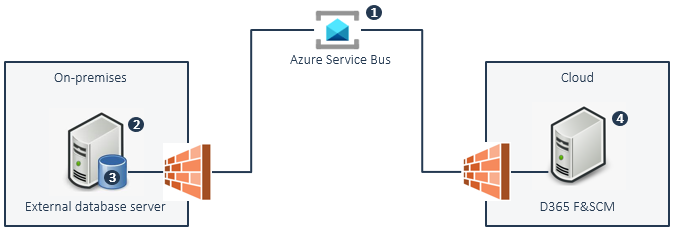
You can connect D365 F&SCM to an external on-premises database. If you connect to an external on-premises database, you must connect through firewalls. With Connectivity studio, you can connect to an external on-premises database using an Azure Service Bus. To establish a connection between an external on-premises database and D365 F&SCM with Connectivity studio, these elements must be in place:
Azure Service Bus namespace.
BIS Azure Service Bus client installed on the external on-premises server.
Data Source Name (DSN) on external on-premises server.
Database connector and ODBC document in Connectivity studio on D365 F&SCM.
This picture gives an architectural overview of the Azure Service Bus solution in Connectivity studio with the required elements. (Note: The numbers in the picture correspond with the before-mentioned element numbers.):
Azure subscription.
D365 F&SCM with Connectivity studio installed.
External on-premises server and database.