With workflow template change management, you can manage changes on your workflow templates. Changes to a workflow template are stored by change set. Each change set is stored as a file in the file storage folder as defined in the Date entry workflow parameters.
Synchronize
You can use workflow template change management to synchronize workflow templates between several D365 F&SCM environments. For workflow template change management, to work properly, the file storage folder, as defined in the Data entry workflow parameters, must be the same for all environments between which workflow template change sets must be synchronized. So, the change set files are stored centrally and can be accessed by all applicable environments.
Use
In Data Entry Workflow, if change management is active, you:
Manage change sets on workflow template level.
Must check out a workflow template to change the workflow template.
Must check in a workflow template to make changes available for other environments.
Can restore a workflow template change set or get the latest workflow template change set.
Example
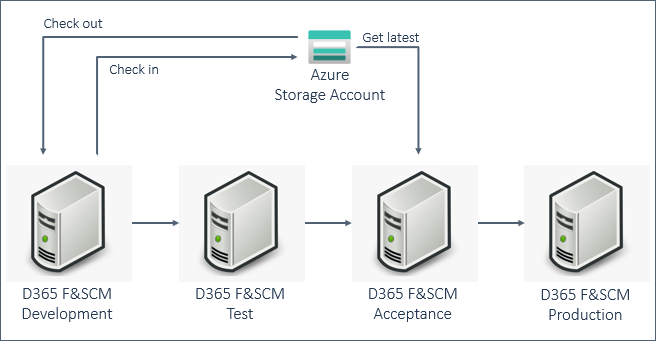
This picture shows an example of a typical environment setup. For each environment, workflow template change management is active, using the same Azure Storage Account and folder to store project version files. In this case, the workflow template is checked out on the Development environment, changes are made, and the workflow template is checked in. Because the changes are required in the Acceptance environment, Get latest is done here.
Scenarios
You can use workflow template change management, for example, for these scenarios:
Workflow template changes: You can easily apply a change to a workflow template in one environment to other environments.
Issue resolution: During testing, you can find and solve an issue in a workflow template in one environment. You can easily apply the solution to the issue to other environments.
Updates in the test environment: In a test environment, workflow templates are often changed. Using workflow template change sets, you make sure that changes are saved, and you can always restore a previous workflow template change set.