You can use the staging concept to validate data in an intermediate area before it is further processed. This is usually used to import data into D365 F&SCM from another system. In this way, you can validate the data before it is written into the D365 F&SCM database. Examples where you can apply a staging journal are:
Incoming sales orders from customers.
Incoming purchase order confirmations from vendors.
Incoming items, BOMs, and routes from a PLM application.
Staging scenario
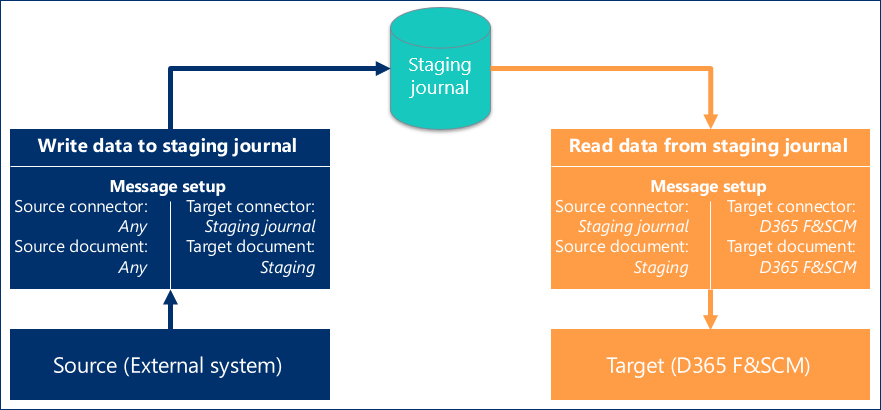
A staging scenario consists of:
A message to import the data from the source into the staging journal. This message has a target document of type Staging and a target connector of type Staging journal.
A staging journal which is an additional table in which the data is validated and approved before the data is imported into the target. Usually, the target is D365 F&SCM.
A message to get the approved data from the staging journal and process it. Usually, the approved data is imported into D365 F&SCM. This message has a source document of type Staging and a source connector of type Staging journal. If the data must be imported into D365 F&SCM, the target connector is of type D365 F&SCM and the target document is one of the internal document types, usually D365 F&SCM.
Staging process
This picture shows the staging process and related setup for data to be imported in D365 F&SCM: