You can use a custom enrichment rule to set a field value using a custom class.
To set up a custom enrichment rule, first develop the custom class to be applied.
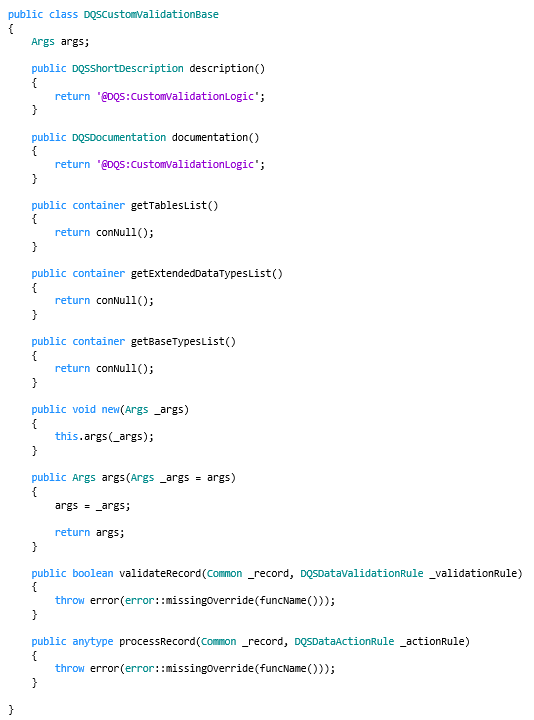
The custom class must extend the DQSCustomValidationBase base class.
When you extend the DQSCustomValidationBase base class:
Enter a unique and recognizable description() for the class. The description is shown in the lookup of the Class name field of a custom enrichment rule.
Use these methods to indicate to which data the custom class applies:
getTablesList(): You can define the tables to which the custom class applies. As a result, you can select the custom class for a custom enrichment rule with one of the applicable tables defined.
getExtendedDataTypesList(): You can assign extended data types to which the custom class applies, for example, 'ExternalItemId'. As a result, you can select the custom class for a custom enrichment rule with a target field defined that uses the same extended data type.
getBaseTypesList(): You can define base data types to which the custom class applies, for example, String or Date. As a result, you can select the custom class for a custom enrichment rule with a target field defined with the same data type.
Use the processRecord() method to define the x++ code that defines the return value that is used as input value for the target field of the enrichment rule.
The base structure of an extended DQSCustomValidationBase class is: