The Connectivity Monitor - PowerApp helps you get insight into all your integrations, for any application. Several pages are available showing KPIs, charts, or a list of integration history records.
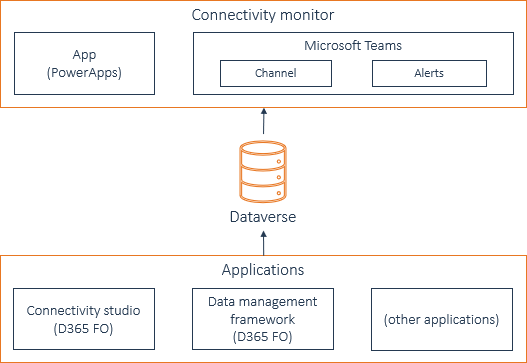
For the applications, you can export the integration history to Microsoft Dataverse. The Connectivity Monitor app can retrieve the integration history data from Dataverse.
You can use the Connectivity Monitor app in Microsoft Power Apps and in Microsoft Teams.
Examples of applications from which you can export integration history to Dataverse are Connectivity Studio and Data management framework, both in D365 F&SCM.
This picture gives a schematic overview of how the Connectivity Monitor app is positioned: