You can apply customized arguments as range parameters to a data export from D365 F&SCM.
Custom code
To create a range parameter as an argument, you must add the desired method along with its argument to the BisDialogBase class. The method must be defined as follows: dialogBase.setFieldValue('[argument]', [code to define the argument value]).
Document
You can use the argument as a range parameter for the source document if it is a D365 F&SCM document. To do this, add a range of type Parameter to the relevant document record, typically the root record. In the Range field, input the exact name of the argument. Ensure that each argument used in a document is unique to that document.
Example
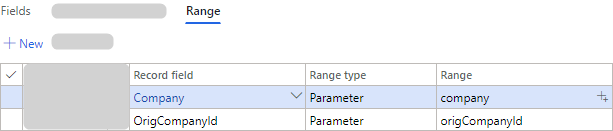
Suppose you want to add the following parameters to the document record range:
company: This is used to get and set the current company.
origCompanyId: This is used to get and set the original company.
The BisDialogBase class contains the following code:
dialogBase = new BisDialogBase();
dialogBase.setFieldValue('company', companyRule.Company);
dialogBase.setFieldValue('origCompanyId', companyRule.getOriginalCompany().CompanyId);
mArgs.packedBisDialogBase(dialogBase.pack());
Add the parameters to the document record range:
Note
If you run a message from code, you can apply these parameters as well.