In Connectivity Studio, usually, you can design the integration setup by configuration. Sometimes, it can be required to use a customization. This topic explains the standard web service action handler handler classes in Connectivity Studio and how to customize these classes. Only use customized classes if you really need specific functionality.
Standard web service action handler classes
For web service actions, several standard handler classes are available. Each web service action direction has its own handler classes:
Document type | Handler class | Description |
|---|---|---|
Outbound handler classes | BisWsClientHandler | Runs the outbound web service action. |
BisWsClientHandlerV3 | Runs the outbound web service action, using streaming. | |
Outbound client HTTP classes | BisWsClientHttpFileRequest | Calls the external web service if files are used to exchange data. The result of the handler class is the input for the web service call. This class also handles the response from the web service. This response is the input for the handler class to process the response in D365 F&SCM. |
BisWsClientHttpRequest | Calls the external web service if streaming used to exchange data. The result of the handler class is the input for the web service call. This class also handles the response from the web service. This response is the input for the handler class to process the response in D365 F&SCM. | |
Inbound handler classes | BisWsServerHandler | Runs the inbound web service action. |
BisWsServerHandlerV3 | Runs the inbound web service, using streaming. |
Customize web service action handler class - Outbound
You can use a customized outbound web service action handler class. To do so, extend a standard outbound web service action handler class. For a customized outbound web service action handler class, you can change the methods as desired. The commonly changed methods are:
runGet
rungetResponseMessage
rungetErrorMessage
HandleHttpRequest
RunPost
unPostResponseMessage
RunPostRequestMessage
RunPostErrorMessage
OnAfterPostResponseMessage
GetClassDescription
Customize web service action Client HTTP class - Outbound
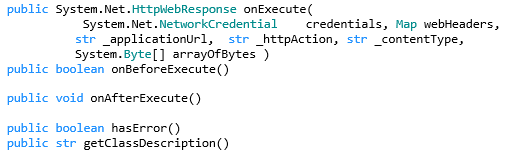
To run the web service HTTP request, a separate class is used. If your HTTP request works different compared to the standard HTTP request, you can extend one of the standard client HTTP classes or create your own client HTTP class. Make sure, it implements the same interface with the same methods as exist in the standard client HTTP classes.
The required interface is: 
Customize web service action handler class - Inbound
You can use a customized inbound web service action handler class. To do so, extend a standard inbound web service action handler class. For a customized inbound web service action handler class, you can change the methods as desired. The commonly changed methods are:
Runget
OnGetRequestMessage
onGetResponseMessage
ongetErrorMessage
RunPost
onPostRequestMessage
onPostResponsemessage
OnPostErrormessage
GetClassDescription