Industrial Equipment Manufacturing (IEM) for Microsoft Dynamics 365 Business Central supports the customer-driven (pull) style of manufacturing.
To further enhance the visibility on your project, you can create additional work breakdown structures.
The Project Management Body of Knowledge (PMBOK 5) defines the work breakdown structure as a "hierarchical decomposition of the total scope of work to be carried out by the project team to accomplish the project objectives and create the required deliverables."
The basic and mandatory breakdown structure for projects in Microsoft Dynamics 365 Business Central is the project task. Only on project tasks can budget and billing lines be created and usage posted.
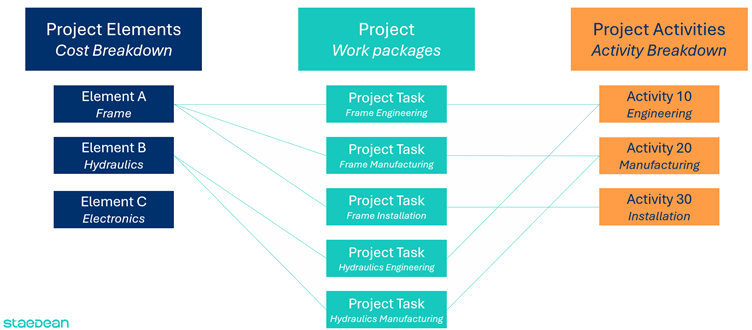
Industrial Equipment Manufacturing adds two additional work breakdown structures (WBSs): Elements and Activities. Although the definition of these WBSs is free, the common application is to use elements for a cost WBS and activities for an activity-based WBS.
As an example based on building a machine, the total machine can be broken down into the frame, the hydraulics, and electronics. On the activity side, you can distinguish between engineering, manufacturing, and installation. These are examples: the definition is free.
The schedule above also shows that you can combine these additional WBSs to create project tasks as work packages:
Project Task 1: Engineering the Frame.
Project Task 2: Manufacturing the Frame.
Project Task 3: Installation of the Frame.
And so on.
In this way, you can allocate material and resources to specific project tasks and at the same time have visibility on the total cost of the element Frame as well as the total amount of engineering spend on the project.