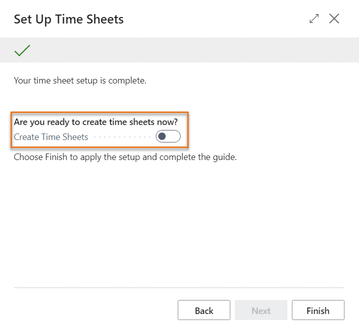
In D365 BC, you can use time sheet features that are automatically enabled for all users. See: Use Time Sheets (Microsoft)
Part of this feature is an Assisted Setup for time sheets. This setup wizard is also useful when installing Industrial Equipment Manufacturing Resource Management because it covers a combination of User Setup, Resources Setup, resources, and employees.
The table below explains the links and best practices between Microsoft Dynamics 365 Business Central's time sheets and Industrial Equipment Manufacturing Resource Management.
Wizard page | Explanation |
|---|---|
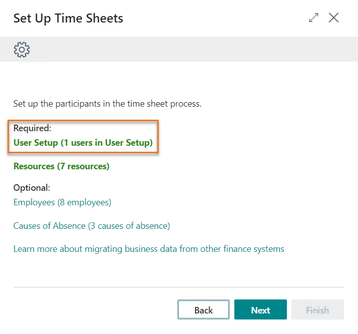
| In Industrial Equipment Manufacturing (JMS), UserIDs and resources are connected in User Setup. Use this link in the wizard to open User Setup and connect the UserIDs to resources. In Industrial Equipment Manufacturing, this link is used in more places than the time sheet, for example, Person Responsible in projects. |
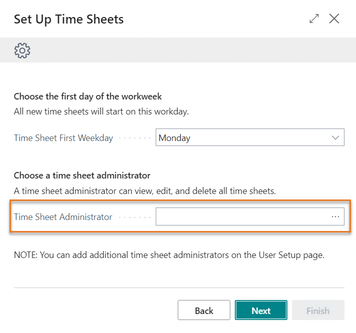
| In Industrial Equipment Manufacturing Resource Management, the best practice is to have only one or two time sheet administrators. The Create Time Sheet wizard lets every user create their own time sheet. |
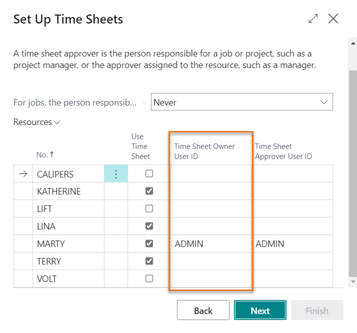
| On this wizard page, Microsoft Dynamics 365 Business Central connects resources to UserIDs. These fields are also available on the Resource card. The best practice is to keep these links the same as in User Setup (see previous wizard page). On this page, you can also set whether you want a separate approval process for project-related entries. If so, set Time Sheet by Project Approval to Always in Resources Setup. |
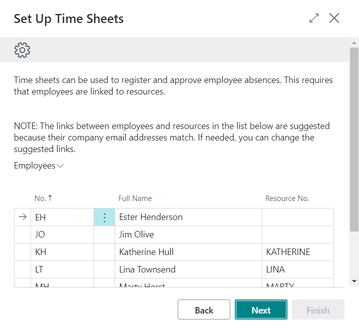
| Industrial Equipment Manufacturing Resource Management does not add functionality around linking employees to resources, although it may be useful for additional information about your people. This link is also available from the Employee card. |
| This function opens the Create Time Sheet batch and is only available to time sheet administrators. In Industrial Equipment Manufacturing Resource Management, this is not necessary because the Create Time Sheet wizard lets each resource create their own time sheet, or the ones for which they have delegated authority. |