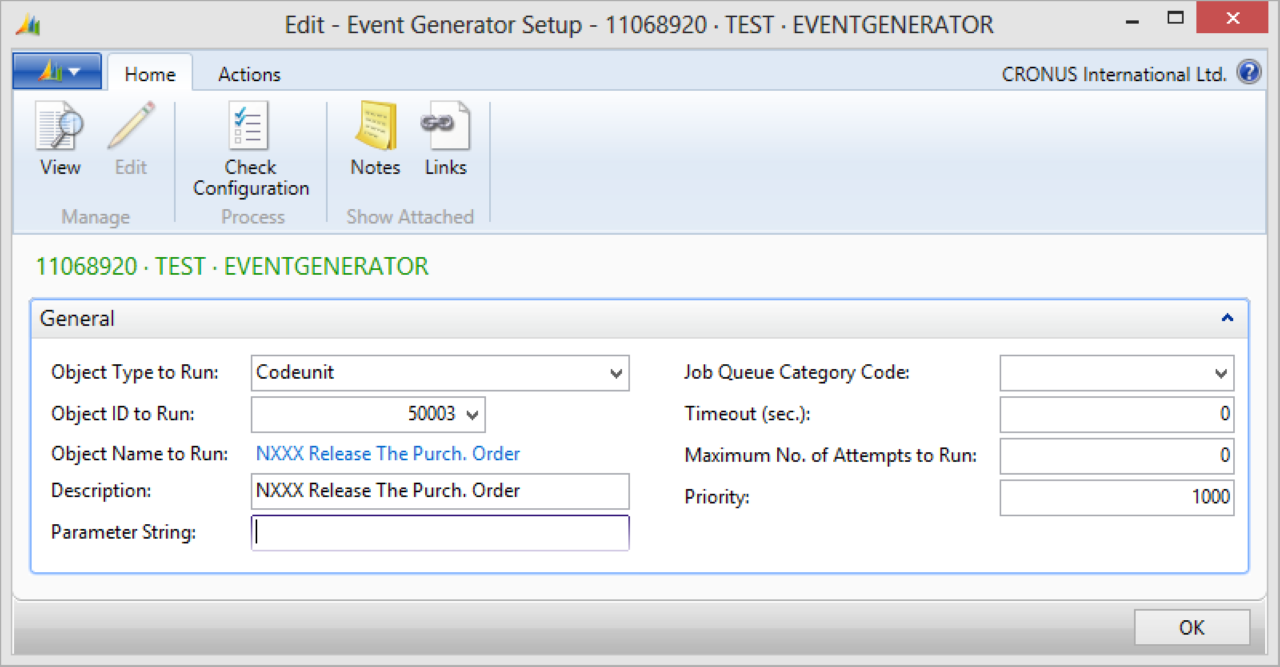
Use an Event Generator activity to generate a job queue event for a message.
To set up the Event Generator activity:
Create a connection and insert the element EVENTGENERATOR.
On the elements line, select Edit.
On the Event Generator Setup page, fill in the following fields:
Field
Description
Object Type to Run
Specifies the type of object: report or codeunit: to run for the job queue entry. After specifying a type, select an object ID of that type in the Object ID to Run field.
Object ID to Run
Specifies the ID of the object to run for this job. Select an ID matching the object type specified in Object Type to Run. If you specify Report, all object IDs of that type are available, but you can only select reports whose ProcessingOnly property is set to Yes.
Object Name to Run
Specifies the name of the object selected in Object ID to Run.
Description
Specifies a description of the job queue entry. You can edit and update the description on the job queue entry card. The description also appears in the Job Queue Entries page, but cannot be updated there. Enter a maximum of 50 characters.
Parameter String
Specifies a text string the job queue uses as a parameter when it runs.
Job Queue Category Code
Specifies the code of the job queue category to which the job queue entry belongs. Select the field to choose a code from the list.
Timeout (sec)
Specifies the number of seconds before a job queue entry times out. If a job queue entry has a timeout set and it times out, the timeout overrides the Maximum No. of Attempts to Run setting. The job queue entry stops attempting to run.
Maximum No. of Attempts to Run
Specifies how many times a job queue task retries after a failure. Useful for tasks that depend on an external resource not always available. By default, set to 0 (zero), meaning infinite attempts. If a timeout is set and it triggers, the timeout overrides this setting.
Priority
Specifies the assigned priority of the job queue entry. Use priority to determine the order in which job queue entries run. A value of 0 indicates the highest priority. The default setting is 1000.
Select Check Configuration to see if there are Anywhere Mobility Solutions configuration errors.
Select OK.