A record handler enables customizations for a specific table of an internal document through interfaces.
The following interfaces expose data manipulation when a RECORDGENERATOR activity runs:
Interface | Description |
|---|---|
| Executes functions or manipulates field values before the record validates and updates. An example is a general journal line that needs a special document number. In the method this interface exposes, the field values are set but not yet validated. |
| Overrides the Insert trigger of a record. D365 BC runs the OnInsert trigger of a record by default. Note: the record does not insert if this trigger does not perform an explicit INSERT statement. |
| Overrides the Modify trigger of a record. D365 BC runs the OnModify trigger of a record by default. Note: the record does not modify if this trigger does not perform an explicit MODIFY statement. |
| Overrides the Delete trigger of a record. D365 BC runs the OnDelete trigger of a record by default. Note: the record does not delete if this trigger does not perform an explicit DELETE statement. |
| Executes after validating the record and updating the database. Use this to update related tables or run additional functions. |
Default record handlers
Three record handlers are available out of the box:
Handler | Remarks |
|---|---|
Base Record Handler | The default handler. |
Business Integration Solutions Reopen Document Handler | Implements |
Business Integration Solutions Update Released Document Handler | Implements |
Create a custom Record Handler
Usage
Use this task when you want to override one or more triggers that run during record generation.
Prerequisites
The following prerequisites are required:
Experience developing in Microsoft Dynamics 365 Business Central AL.
Basic understanding of Business Integration Solutions.
A development license.
Steps
Create a new codeunit and implement one to five interfaces:
codeunit 50000 YourCustomHandler implements BISIOnBeforeProcessRecord, BISIOnInsertRecord, BISIOnModifyRecord, BISIOnDeleteRecord, BISIOnAfterProcessRecord
{
    var
        // All procedures required by the implemented interfaces must be created.
        // If you only need to hook into OnInsert, put your logic there and let the
        // Base Connector handle the rest.
        BaseConnector: Codeunit "TIC Table Connector Base"
    procedure OnBeforeProcessRecord(var Rec: RecordRef): Boolean
    begin
        exit(BaseConnector.OnBeforeProcessRecord(rec));
    end;
    procedure OnInsertRecord(var Rec: RecordRef): Boolean
    begin
        // Add your logic for inserting a record here.
        Rec.Field(YourTable.FieldNo(YourFieldNumber)).Value('New value');
        exit(BaseConnector.OnInsertRecord(rec));
    end;
    procedure OnModifyRecord(var Rec: RecordRef): Boolean
    begin
        exit(BaseConnector.OnModifyRecord(rec));
    end;
    procedure OnDeleteRecord(var Rec: RecordRef): Boolean
    begin
        exit(BaseConnector.OnDeleteRecord(Rec));
    end;
}
Create an enum extension that extends
BISRecordHandler. If you already have one, skip to the next step:enumextension 50000 YourEnumExtension extends BISRecordHandler { ... }
Add a new value in the enum extension that references your custom handler from step 1:
enumextension 50000 YourEnumExtension extends BISRecordHandler
{
    value(YourCustomHandlerId; YourCustomHandler)
    {
        Implementation =
            BISIOnBeforeProcessRecord = YourCustomHandler,
            BISIOnInsertRecord = YourCustomHandler,
            BISIOnModifyRecord = YourCustomHandler,
            BISIOnDeleteRecord = YourCustomHandler,
            BISIOnAfterProcessRecord = YourCustomHandler;
    }
}
Note
You can also mix and match, use a combination of the custom handler and the base connector. This way you only implement the needed interfaces, and the base connector handles the rest by default. See the example below.
// Enum extension example
value(YourCustomHandlerId; YourCustomHandler)
{
    Implementation =
        BISIOnBeforeProcessRecord = YourCustomHandler,
        BISIOnInsertRecord = "BIS RecordHandler",
        BISIOnModifyRecord = "BIS RecordHandler",
        BISIOnDeleteRecord = "BIS RecordHandler",
        BISIOnAfterProcessRecord = YourCustomHandler;
}
// Codeunit handler example
codeunit 50000 YourCustomHandler implements BISIOnBeforeProcessRecord, BISIOnAfterProcessRecord
{
    procedure OnBeforeProcessRecord(var RecRef: RecordRef): Boolean
    begin
        // Execute your logic here.
    end;
    procedure OnAfterProcessRecord(var RecRef: RecordRef): Boolean
    begin
        // Execute your logic here.
    end;
}
Go to your Record Generator activity setup page and select the Design action for the linked document.
On the document design page, select the table node where you want to use the new record handler.
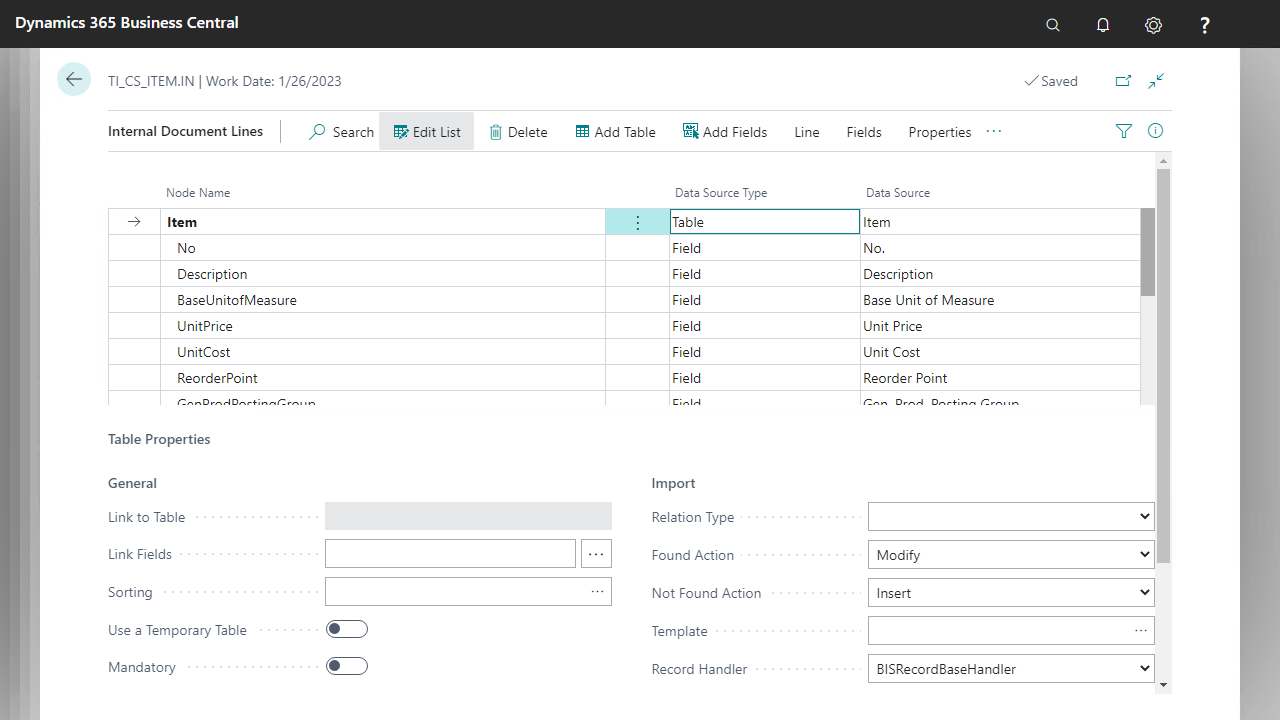
Upgrading custom connectors
The following is an example of a legacy custom connector with the OnInsertRecord hook:
codeunit 50000 "DemoCustomConnector"
{
    procedure OnInsertRecord(var Rec: Item): Boolean
    begin
        // Your custom logic
    end
}
To upgrade this connector:
Make the custom connector implement
BISIOnInsertRecord.Implement the
OnInsertRecord(var RecRef: RecordRef)procedure by calling the legacyOnInsertRecord(var Rec: Item), or calling the default BISRecordHandler if the table is not supported by your logic:codeunit 50000 DemoCustomConnector implements BISIOnInsertRecord { procedure OnInsertRecord(var RecRef: RecordRef): Boolean var Rec: Record Item; Result: Boolean; begin if RecRef.Number() <> Database::Item then exit(BISRecordHandler.OnInsertRecord(RecRef)); RecRef.SetTable(Rec); Result := OnInsertRecord(Rec); RecRef.GetTable(Rec); exit(Result); end; procedure OnInsertRecord(var Rec: Item): Boolean begin // Your custom logic end }Note
Make sure to update
RecRefagain before exiting, using theRecRef.GetTableprocedure.Add the codeunit to an enum extension extending
BISRecordHandler:enumextension 50000 "DemoRecordHandler" extends BISRecordHandler { value(50000; DemoHandler) { Caption = 'Demo Record Handler'; Implementation = BISIOnBeforeProcessRecord = "BIS RecordHandler", BISIOnInsertRecord = DemoCustomConnector, BISIOnModifyRecord = "BIS RecordHandler", BISIOnDeleteRecord = "BIS RecordHandler", BISIOnAfterProcessRecord = "BIS RecordHandler"; } }Note
One codeunit can implement several interfaces.