Project Control Suite makes it possible to track inventory pegged for a project. This functionality is based on the Control supply from project setting.
Based on the reservation, project WIP can be made visible at three levels:
Project WIP, actually consumed in the project (project ledger entries).
Expected WIP, received in inventory, reserved for the project, but not consumed or delivered.
Committed WIP, remaining quantity on supply orders reserved for the project but not received.
The above can be made visible in a report: Project WIP and Expected WIP (reports from the Industrial Equipment Manufacturing - Project Manager role center). A query (IEMProjects.Query.al) is also provided that pulls together a dataset on which a Power BI report can be created:
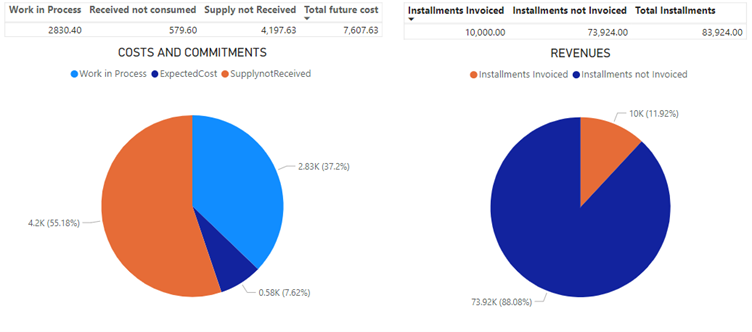 Example report