Templates make projects repeatable. When a company regularly runs the same type of projects, or projects with the same structure, that experience and knowledge can be embedded in templates. When creating a new project or a project quote, select a template to quickly create a project structure.
The following templates can be used:
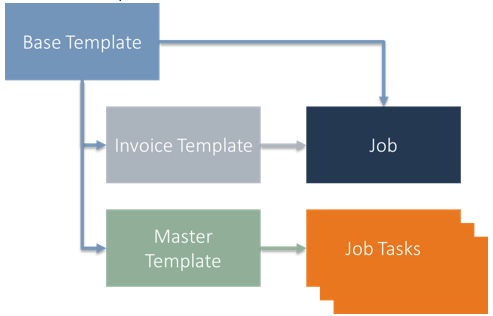
Project template: define the header for the project or the project quote version. The base template can also hold a master template and an invoice template.
Project task template: define default structures and the budget. Linked from the base template (optional) or loaded to build the project structure in a modular way.
Invoice template: define the invoicing method for the project and set different payment schedules for the fixed price method. Can be linked to the base template.
Steps - Load template
You can insert project task templates in a project task list with the Load Template action:
From the Project Tasks line menu, open Functions > Load Template.
A pop-up asks: "Do you want to load a master template?"
Complete the following fields and confirm with Yes:
Field
Description
Master Template Code
Select a released master template code.
Load Tasks
Enable to load the project tasks from the selected master template. Default is true.
Task Starting No.
Specify a starting number for the new project tasks. The first number includes the step size.
Step-size Task Nos.
Specify a number as the interval between the new project task numbers.
Load Elements
Enable to load the project elements from the selected master template. Default is false.
Element Starting No.
Specify a starting number for the new project elements. The first number includes the step size.
Step-size Element Nos.
Specify a number as the interval between the new project element numbers.
Load Activities
Enable to load the project activities from the selected master template. Default is false.
Activity Starting No.
Specify a starting number for the new project activities. The first number includes the step size.
Step-size Activity Nos.
Specify a number as the interval between the new project activity numbers.
You can also select a surcharge model per project task as a template for surcharges such as risk and project management. Use elements and activities to create cost breakdown structures and activity breakdown structures for the project.
Note
The use of templates as well as elements and activities is optional within Industrial Equipment Manufacturing.