When Project Control Suite is combined with Resource Management, the project planning line shows the following groups:

Item BOM actions

Create BOM and Routing Version: creates a new version of the production BOM and routing specific to this project.
Show BOM and Routing Version: opens the project-specific version of the production BOM and routing.
Cost Price per Lot Size: calculates a new cost price for a project-specific production BOM and routing and updates the project planning line.

Reset Project Assembly BOM: when an assembly item is inserted in the project planning line, a project assembly BOM is automatically created. Use this action to recreate that assembly BOM.
Show Project Assembly BOM: opens the project assembly BOM so you can view and modify it.
Delete Project Assembly BOM: removes the project assembly BOM.
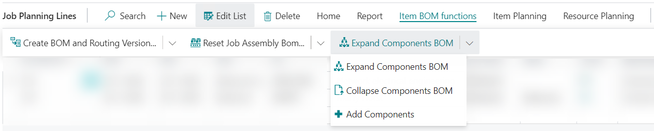
Expand Components BOM: expands an assembly BOM into individual project planning lines. The parent line is kept without a quantity. Entering another quantity in this line updates the quantities on the entire set. The last used quantity is kept in a separate field: Industrial Equipment Manufacturing Qty. before BOM Explosion.
Collapse Components BOM: collapses the expanded project planning line so the parent line can be used as an assembly order again.
Add Components: adds a component to an expanded list in the project planning lines. The quantity is updated with the set.
Item planning

Order Planning: opens the Microsoft Dynamics 365 Business Central Order Planning page to plan and create replenishment orders for inventory items.
Show Replenishment Document: opens a replenishment document for the selected project planning line.
Cancel Replenishment: cancels a replenishment document for the selected project planning line.
Create, non-invent., Purchase Quotes: creates a purchase quote for non-inventory or service items or resources.
Create, non-invent., Purchase Orders: creates a purchase order for non-inventory or service items or resources.
Resource planning
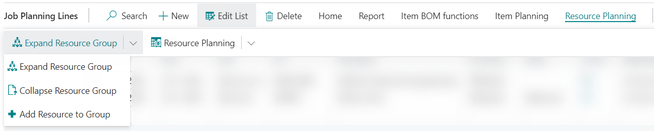
Expand Resource Group: when the project planning line is for a resource group, expand the resource group into individual resources first. You can select which resources to include.
Collapse Resource Group: when collapsing an expanded resource group, the selections made while expanding are lost, as well as resources temporarily added to the resource group.
Add Resource to Group: temporarily adds a resource to an expanded resource group.

Resource Planning: opens the Resource Planning page to plan resources on a daily basis.
Resource Workload: opens the Resources Workload page to check resource capacity, allocations, and load %. From the workload page, open the Resource Availability page.
Resource Group Workload: opens the Resource Groups Workload page to check resource capacity, allocations, and load %. From the workload page, open the Resource Group Availability page.
Additional actions
Sync Planning Date: this wizard updates the project planning date and the related replenishment order date in the correct sequence.
Re-locate Inventory: this wizard creates a transfer order to move inventory reserved for the project planning line to another location.
Insert Ext. Texts: inserts extended texts to the project planning lines as specified for the master data (item, resource, G/L account).
Link G/L to Item Planning Line: links a project planning line of the type G/L Account to a project planning line of the type Item. When creating a purchase document, the linked line is also copied.
Move Project Planning Line: moves the selected project planning line to another project task.
Container Status: shows the containers packed for this project planning line.
Order Tracking: a Microsoft Dynamics 365 Business Central function to show related supply orders as per the reservation entries.
Demand Overview: a Microsoft Dynamics 365 Business Central function to show the supply and demand for the item on the selected project planning line.
Warehouse, create inventory pick: creates an inventory pick for the item on the selected project planning line.
Create warehouse pick: creates a warehouse pick for the item on the selected project planning line.