Microsoft Dynamics 365 Business Central recognizes the following item types:
Inventory
Service
Non-inventory
See also: About item types (Microsoft).
The matrix below shows the features that each item type supports:
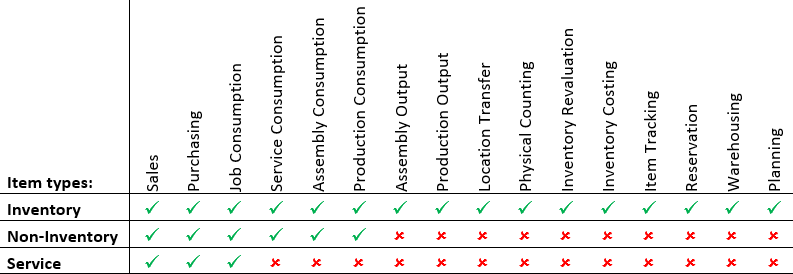
All three item types can be consumed in a project. However, there is a difference in processing.
Inventory items
Items of the type Inventory must be ordered through Order Planning (or MRP) for all replenishment types (purchase, assembly, production, and transfer). Receiving inventory creates an item ledger entry. To consume or deliver the item, post the ProjectPlanning line to create an item ledger entry of the type Negative Adjustment and a ProjectLedger entry (moves the item from inventory to work in process).
Service and non-inventory items
For item types Service and Non-Inventory, as well as for resources and G/L accounts, a purchase action is available from the ProjectPlanning line to create a purchase order from the planning line.
Because the reservation system is not available for this type of order, the source document (purchase) is directly linked to the planning line. When the source document is posted, the ProjectPlanning line is updated and the ProjectLedger entry is created as well.