Central to the D365 BC Anywhere Framework is the D365 BC Anywhere Portal. Using the Anywhere Mobility Solutions web service to connect to Microsoft Dynamics 365 Business Central, the D365 BC Anywhere Portal brings Microsoft Dynamics 365 Business Central into the mobile world. The D365 BC Anywhere Portal presents users with an attractive, fast, and reliable user interface designed to work seamlessly with Anywhere Mobility Solutions mobile device. The interface makes the most of the mobile device, providing a clutter-free view of the application and making full use of additional resources like barcode scanners and RF tag readers to improve user productivity.
The following figure shows the overall architecture and the components that make up the D365 BC Anywhere® Mobile Business Solution:
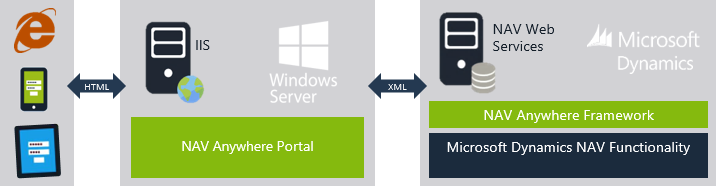
Many mobile devices have a limited browser implementation due to their design and configuration, making ordinary HTML-based solutions unsuitable. The D365 BC Anywhere® Framework runs on Anywhere Mobility Solutions device with a browser and fully supports several device types and form factors simultaneously.
Meet the system and hardware requirements (refer to the Installation Guide) for each component before installing. When you confirm that your host environment meets the requirements in the following topics, proceed to the appropriate installation section.
This guide focuses on configuring and modifying applications built within the D365 BC Anywhere Framework. For details on installing and configuring the Portal, web service, and Framework in D365 BC, refer to the Installation Guide.
The framework in Microsoft Dynamics 365 Business Central
The Framework in Microsoft Dynamics 365 Business Central includes a configurator that lets you create a mobile user interface. The Framework also contains the logic to interpret and process requests from mobile users and create a response. This interfaces with Microsoft Dynamics 365 Business Central business logic, letting the user validate or query data, call Microsoft Dynamics 365 Business Central objects to perform registrations, and so on.
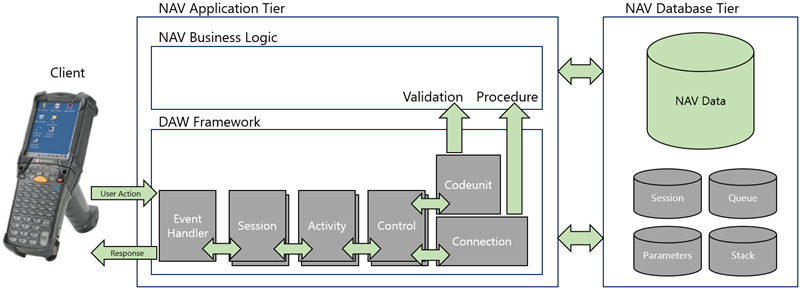
The diagram above shows how the different parts work together and how the framework interacts with the rest of Microsoft Dynamics 365 Business Central.
User actions arrive from the Anywhere Portal through the Anywhere Mobility Solutions web service.
The event handler looks up the session that belongs to the user (or creates a new one if the user is logging in) and passes the event to the application. The event handler then processes the request from the Portal, finds the next activity in the process, creates a response, and passes it to the Portal.
Because the Framework exists in the Microsoft Dynamics 365 Business Central application tier, it can validate user input, register data, or call other D365 BC business logic.