Industrial Equipment Manufacturing uses the Critical Path Method (CPM) to calculate the timeline for a project.
Understanding what CPM does
CPM is a project modelling technique originally developed in the 1950s. In various iterations, it has been used in manufacturing, engineering, plant maintenance, and many other disciplines. Many project-based manufacturers rely on a modern version of CPM. Today, CPM is described as an algorithm that applies to Anywhere Mobility Solutions project involving several interdependent activities:
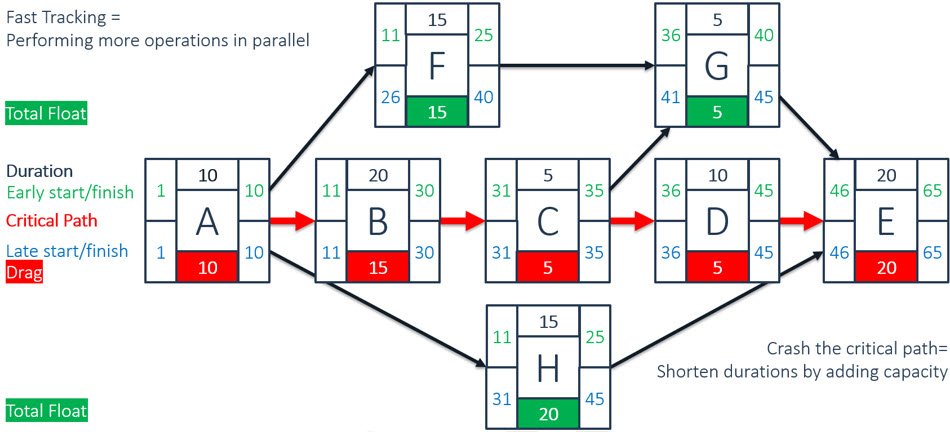
In CPM, you calculate the shortest time possible to complete a project. The calculation establishes the longest path of activities in reaching the project goal, along with the earliest and latest times that each activity can start or finish without lengthening the project. CPM determines which activities are critical (they are on the longest path) and which parallel activities can be delayed without extending the project. This property is known as Float.
Visual, intuitive, and efficient CPM
In the Project Control Suite module of Industrial Equipment Manufacturing, CPM is enabled through several additional fields in the project task:
Every project task can point to one or more Next Tasks. There is no separate setting for serial or parallel calculations and previous tasks.
For every project task, set the No. of (working) Days planned for the project task.
When you select Initialize Task Dates, you can calculate project task dates forward from the project starting date or backward from its ending date. Once the first task is underway, you can only perform forward calculations. The solution calculates the critical path and shows project task dates in red.
In a separate column, parallel tasks show Float days in green. You can move these tasks by the number of float days without disturbing the critical path.
Note
On the Project card, Planning tab, set the Starting Point to Earliest to start the parallel task on the earliest starting date, or to Latest to start the task at the latest starting date.
When you change project task dates, planning conflicts may occur on the project task planning lines. The ProjectPlanning line is highlighted (ambiguous). In the Project Task Information fact box, the item planning lines change to red when one of the ProjectPlanning lines has this warning state.
The Duration and start and end date fields are linked. When you change a duration, a new end date is calculated. When you change a date, a new duration is calculated.
The Calculate Task Planning action is only visible when there is a planning overlap. This action only performs a forward calculation and changes the ending date of the project. Initialize Task Planning calculates in both directions based on the settings in the Project card, but recalculates all project tasks.
Milestones
A milestone is a scheduled event that indicates the completion of a major deliverable event (or a set thereof) of a project. Milestones are measurable and observable and serve as progress markers (flags) but, by definition, are independent of time (have zero duration). No work or consumption of resources is associated with the milestone.
In Industrial Equipment Manufacturing, the milestone sets a marker in the project's timeline. It is not recalculated by the Calculate Project Task action and you cannot set a next task to or from the milestone.
Project tasks of the type Milestone only accept planning lines of the type Billable, to support milestone-type billing of a contract amount. Sales revenue is posted to these project tasks.