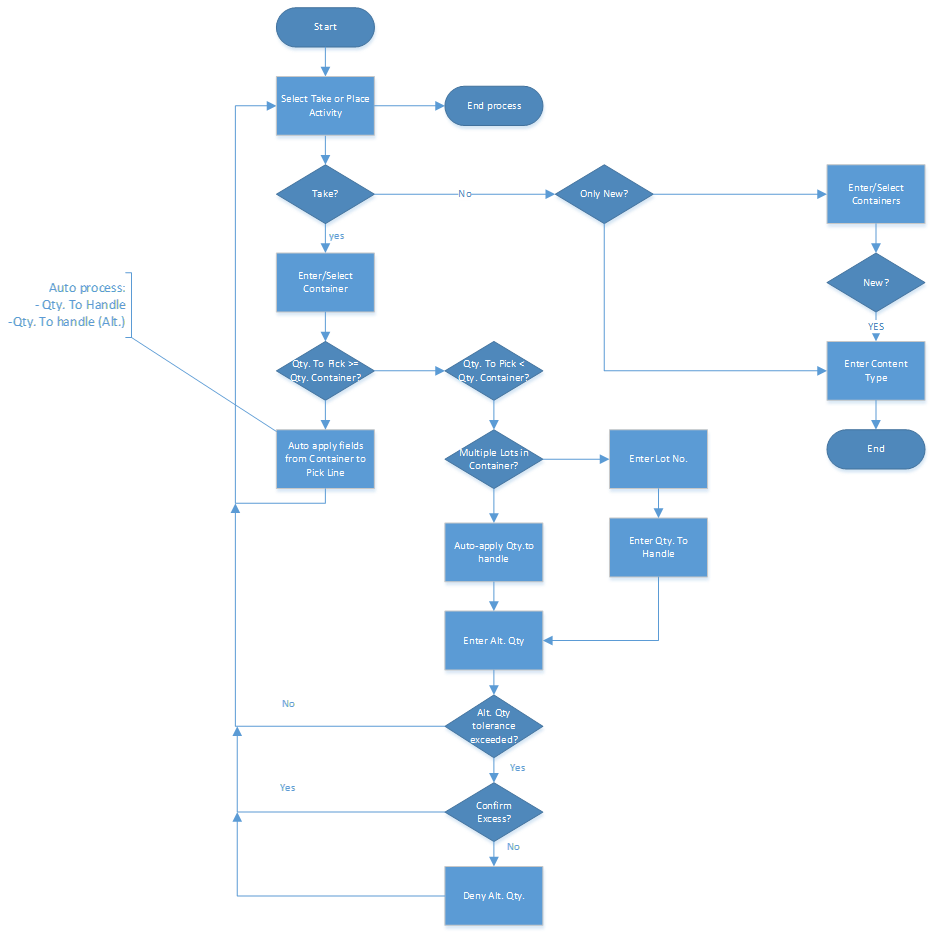
Add Container is a sub-process. You can use it in, for example, Warehouse Pick, Bin-to-Bin Movement, and Warehouse Movement.
In warehouse documents, you can use the container functionality that is part of the Food Manufacturing & Distribution solution. The overall flow shows what paths you can follow, what user input is required, and which checks to perform.
The Add Container sub-process includes the following functionality:
Selection page to choose a Take or Place action
Scan or enter the container number on a card page (Take line)
Display associated containers for the selected item via lookup (Take line)
Add containers from the displayed list to the warehouse document (Take line)
Check quantity on container
Handle several lots in a container
Scan or enter the container number on a card page (Place line)
Display linked containers for the current warehouse document (Place line)
Add a new container (Place line)