Property | Description |
|---|---|
Process Code | Identifier of the process the activity belongs to |
Code | Uniquely identifies the activity |
Table Name | The table this activity's data relates to |
No. of Controls | Number of related controls |
No. of Filters | Number of related filters in the filter set |
Alternate Key | Changes the sort order of the records in a data grid. Available sorting depends on the keys in the Microsoft Dynamics 365 Business Central table. |
Sort Order | Changes the sorting: ascending or descending |
Filters
Limit the dataset of an activity using filters. This includes the records displayed on a data grid. The fields available for filtering come from the activity's table name. Configure the filter value using an expression that evaluates to a filter value.
The filter results in a table view (similar to the "sourcetableview" property in pages). This means the filter value is interpreted as a filter, not as a field value. The expression can contain values such as: 1, order, yes, >20, 3...7, and so on.
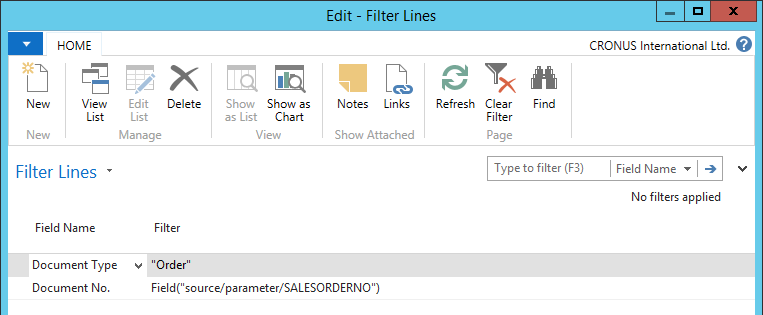
There are three types of arguments for a filter expression, entered using a wizard:
Constant: Enter the filter value as a string of characters.
Field: The filter value can be a field from the table the activity's table name represents. The expression evaluates to the value from the field in the record active in the previous activity with the same table. This option also supports parameters and a selection of session fields.
Function: A custom function generates the filter value. The function contains code that evaluates to a value usable as (part of) a filter. When the function takes arguments, the next screen of the wizard shows them. Address each argument to a constant, field, or another function (nesting of functions is supported).
Filters with several lines in their expression are combined.